

Almost every organisation already has plenty of knowledge. It sits in documents, emails, tickets, project folders and in the heads of experienced employees. The problem is rarely that knowledge is missing. The problem is that nobody can find it when it is needed, or that it retires along with a colleague.
This guide explains what knowledge management means for a company, which types of knowledge exist, which methods and models have proven themselves and how you can introduce knowledge management in six steps. It also covers KPIs, typical mistakes and examples from companies that use software and AI to make their knowledge findable today.
Table of Contents
Key points at a glance
- Definition: Knowledge management is the systematic handling of an organisation’s knowledge. It is about identifying, securing, sharing and using knowledge.
- Two types of knowledge: Explicit knowledge is written down in documents; tacit knowledge lives in experience and routines. Effective knowledge management takes care of both.
- Why now: By 2040, around 13.3 million members of Germany’s labour force will reach the statutory retirement age. They take experience with them that is often not documented anywhere.
- Implementation: Successful projects start with a clear goal and a pilot area, name the people responsible and measure the benefits.
- Tools: Software and AI do not replace a knowledge culture. But they reduce the effort when knowledge can be found where it is already maintained.
What is knowledge management?
Knowledge management is the systematic handling of an organisation’s knowledge. You decide which knowledge matters, make it findable, share it with the right people and make sure it is retained, even when people leave the company. The goal: knowledge feeds into decisions and processes.
A simple distinction between data, information and knowledge helps here:
- Data consists of individual facts without context, for example sales figures in a spreadsheet.
- Information is data with context, for example the insight that sales rose in the fourth quarter.
- Knowledge is the ability to interpret information and act on it, for example understanding why the figures rose and how to repeat the success.
A similar tiered model is North’s knowledge staircase, developed by Klaus North. It leads from symbols to data, information and knowledge, and on to skills, action, competence and competitiveness. The message behind it: knowledge only becomes a competitive advantage when it is applied.
Explicit, tacit and structured knowledge
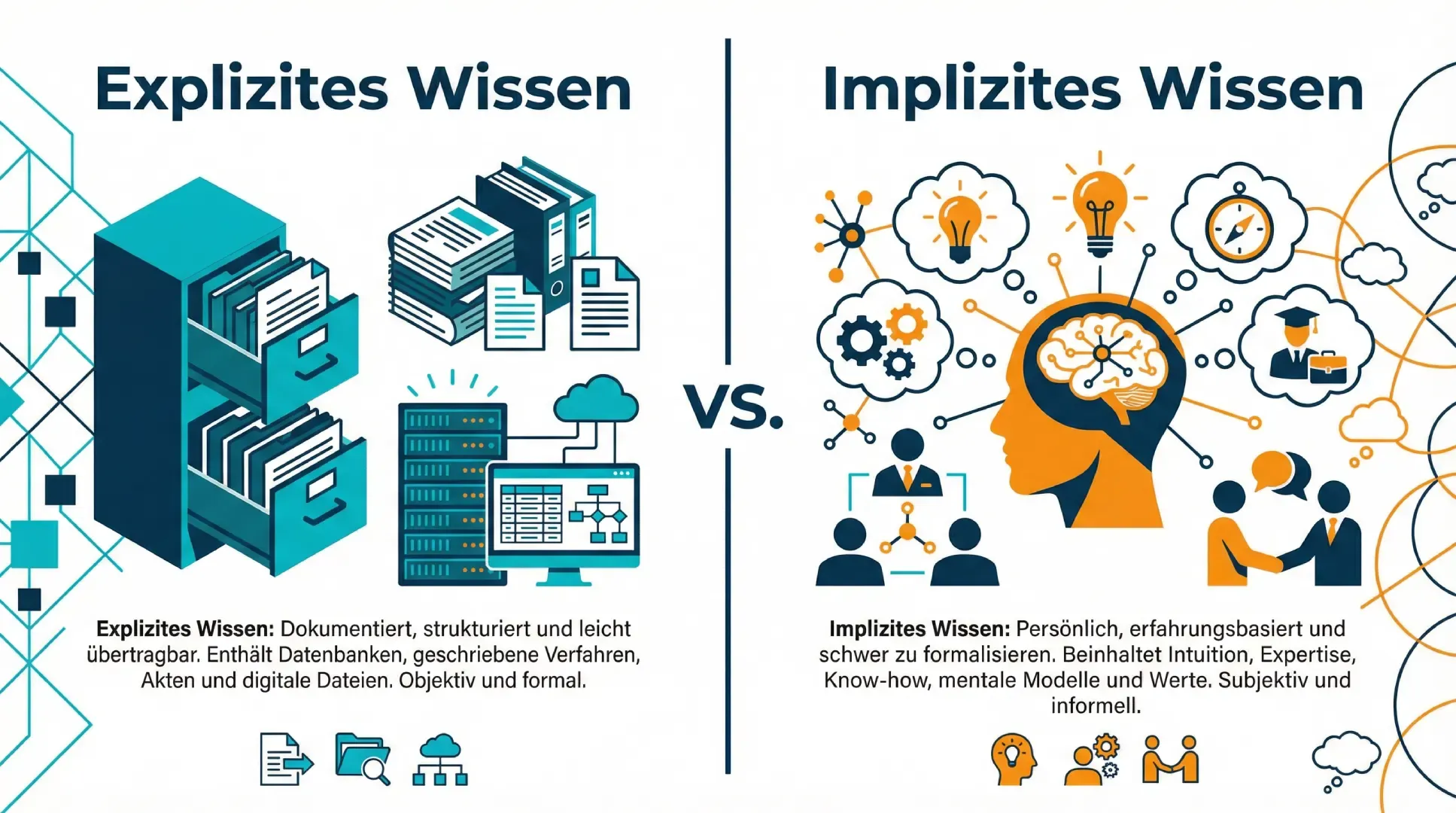
In everyday business, you come across three forms of knowledge:
- Explicit knowledge is documented: manuals, process descriptions, contracts, minutes, presentations and emails. It can be stored, searched and passed on.
- Tacit knowledge (also called implicit knowledge) is knowledge based on experience: Who knows which customer? Why was a component changed ten years ago? Which simple fix solves a recurring problem? This know-how sits in the heads of knowledge holders and is lost through staff turnover or retirement if nobody captures it.
- Structured knowledge is held in tables in systems such as ERP, CRM or PLM: key figures, master data, product properties. Business intelligence tools analyse it.
A large part of knowledge management work consists of turning tacit knowledge into explicit knowledge and making documented knowledge available so that people can actually find it.
How it differs from information and document management
The terms are often used interchangeably, but they mean different things:
- Document management governs how files are stored, versioned and archived. A document management system (DMS) is a tool, not a concept for handling knowledge.
- Information management ensures that information reaches the right people at the right time. Our article on information management in IT shows how IT departments approach this.
- Knowledge management is the broader approach: it also covers tacit knowledge, a knowledge-sharing culture and the question of how knowledge feeds into decisions.
Why this matters for productivity today
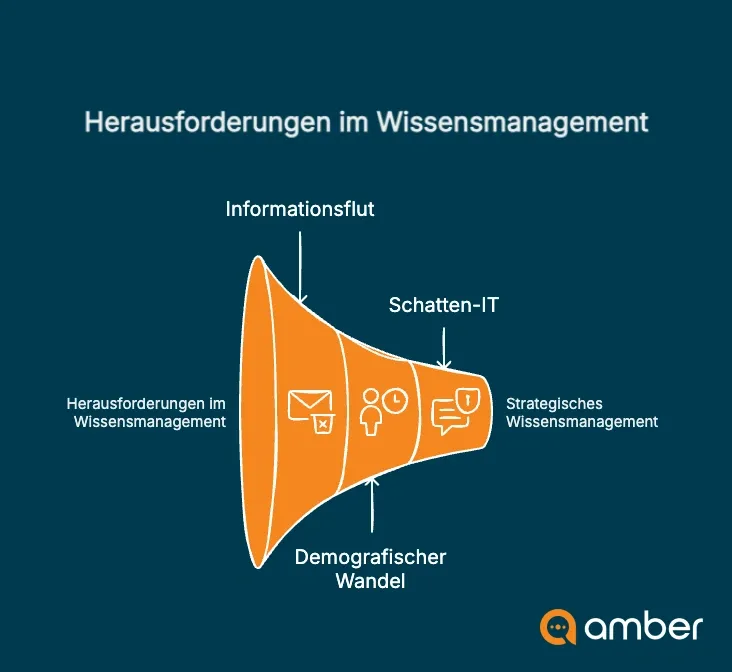
Three challenges make knowledge management more urgent for companies than it was a few years ago: the volume of information keeps growing, experienced employees are retiring, and people who cannot find anything internally turn to private AI tools that nobody has approved. This shadow IT does not solve the search problem, but it creates new risks for data protection and compliance.
What missing knowledge costs
Searching takes up working time. According to a study by the McKinsey Global Institute from 2012, knowledge workers spend nearly 20 per cent of their working week looking for internal information or tracking down colleagues who can help with a task.
A simple calculation shows the scale: if you spend 30 minutes a day searching on 220 working days, that adds up to 110 working hours a year. On top of that come duplicated work, mistakes caused by outdated documents and decisions made on incomplete information. Our article on the business case for knowledge management shows how to calculate the costs for your company. The costs that are often overlooked are covered in The hidden costs of poorly retrievable knowledge.
Knowledge management is therefore not just an IT project. It is a lever for efficiency, quality and better decision-making.
Demographic change and knowledge loss
According to calculations by Germany’s Federal Statistical Office (Destatis), around 13.3 million members of the German labour force will have passed the statutory retirement age of 67 by 2040. That is 30 per cent of today’s labour force in Germany. Staff turnover adds to this: people who move on after a few years take knowledge with them that has often never been written down.
Data silos make the problem worse. Information is spread across email inboxes, network drives, SharePoint, the CRM and the ERP. New employees can hardly tell where the current version is or whom to ask. Our article on the knowledge worker describes how the role of employees is shifting towards knowledge work.
The process: building blocks and cycle
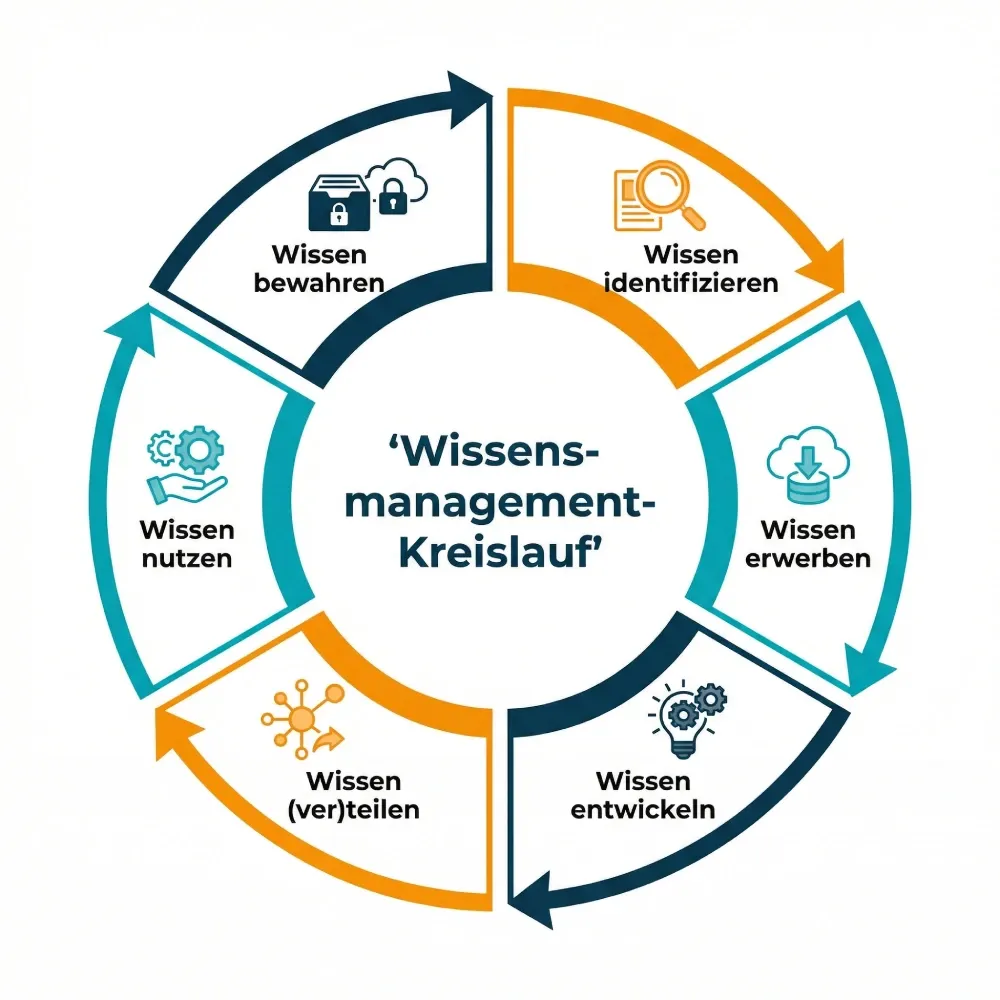
The knowledge management process is not a one-off project but a cycle. A model widely used in German-speaking countries comes from Gilbert Probst, Steffen Raub and Kai Romhardt. At its core are six phases that knowledge passes through again and again in an organisation:
- Identify knowledge: Which knowledge is critical, and where is it? In whose heads, which systems and which documents?
- Acquire knowledge: Which knowledge do you bring in from outside, for example from customers, partners or new hires?
- Develop knowledge: How is new knowledge created, for example in projects, in research and development or by analysing mistakes?
- Share knowledge: How does the right knowledge reach the right people at the right time?
- Use knowledge: Is the knowledge actually applied in processes and decisions?
- Preserve knowledge: How do you secure knowledge for the long term so that it is not lost when people change roles or leave?
The cycle is framed by two further building blocks: knowledge goals set the direction, and knowledge assessment checks whether the goals have been achieved. Together they make up the eight building blocks of knowledge management. In practice, this means: do not start with a tool, start with a goal, and measure at the end whether anything has improved.
Knowledge management methods and models at a glance
Knowledge management models help you structure the topic. Methods are the practical tools you use in day-to-day work. The two belong together. Two models come up particularly often in companies: the SECI model and the building blocks of knowledge management by Probst, Raub and Romhardt.
The SECI model by Nonaka and Takeuchi
The SECI model developed by the Japanese researchers Ikujiro Nonaka and Hirotaka Takeuchi describes knowledge creation: how new knowledge emerges when tacit and explicit knowledge flow into each other. It distinguishes four phases:
- Socialisation: Experience is passed on directly, for example by working together or watching others (tacit to tacit).
- Externalisation: Experience is put into words, sketches or documents (tacit to explicit).
- Combination: Existing documents are brought together and reorganised (explicit to explicit).
- Internalisation: Employees absorb documented knowledge by applying it (explicit to tacit).
The four phases repeat and form a spiral: with each round, the organisation’s collective knowledge grows.
Building blocks by Probst, Raub and Romhardt
Their model, known as the building blocks of knowledge management, consists of the six core processes from the cycle above plus two more: knowledge goals and knowledge assessment. Its strength lies in diagnosis: it shows where things are getting stuck. Without identification, nobody knows who is an expert on a topic. Without preservation, knowledge disappears with every change of staff. Without use, documented knowledge sits untouched in folders.
Practical methods for everyday work
Which method fits depends on which knowledge you want to secure or share. These methods can be introduced without a major project:
- Lessons learned: After each project, you record what went well and what should be done differently next time. What matters is that the results are stored where people can find them.
- Expert directory: A directory shows who knows about which topics. This helps employees find the right contact faster.
- Mentoring and tandems: Experienced and new colleagues work closely together for a while. This passes on tacit knowledge that is hard to write down.
- Expert interviews before people leave: Anyone who retires or leaves the company answers structured questions about their area of expertise. Today, AI makes recording, transcribing and summarising these interviews easier. This is an important building block of knowledge retention.
- Communities of practice: Specialists from different departments meet regularly to exchange ideas on a topic. This encourages knowledge sharing across departmental boundaries.
- Knowledge base and wiki: Answers to frequently asked questions, instructions, checklists and templates are kept in one place. Recurring processes are described properly once and then used by everyone.
- Knowledge maps: A visual overview shows which areas of knowledge exist, where the knowledge sources are and who holds the knowledge.
Introducing knowledge management in your organisation: 6 steps
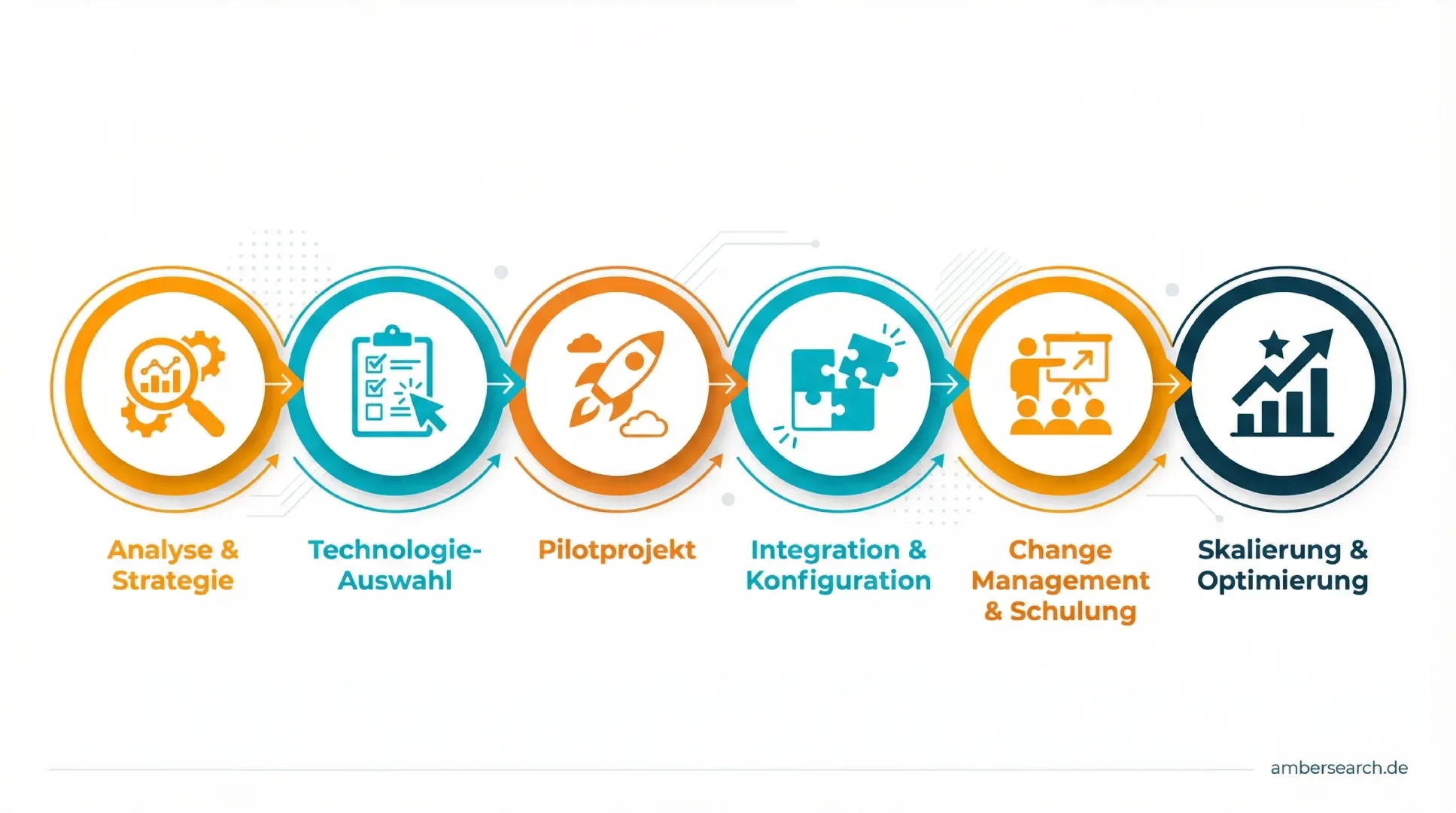
Introducing knowledge management is a change process, not just an IT project. This sequence helps you start small and show the benefits early.
Step 1: Define goals and critical knowledge
Set measurable goals, for example faster onboarding in service or fewer follow-up questions in sales. Clarify which knowledge is critical for these goals and who holds it today. Record both in a short knowledge management strategy. A short survey on search time gives you a baseline, as described in our two frameworks for capturing research time.
Step 2: Choose your tools
Assess knowledge management systems against your requirements: Which systems need to be connected? Are access rights preserved? Can answers be traced back to their source? Where is data processed? Choose a provider who will also support you with rollout and adoption.
Step 3: Start with a pilot area
Start with a department or use case where the pain is greatest, for example field service, research and development or IT support. A pilot quickly shows whether the approach works and provides arguments for the next steps.
Step 4: Connect sources and adopt permissions
Connect the relevant systems and make sure the existing permissions concept is adopted. Each person may only see what they are allowed to see in the source system. Adjust the settings to the needs of the pilot team.
Step 5: Bring people on board and train them
This phase makes or breaks the project. Explain the benefits, show concrete examples from everyday work and train people not only in using the tool but also in the new way of working. Appoint knowledge champions who answer questions and get others on board.
Step 6: Measure, roll out, improve
After a few weeks, compare the KPIs with the baseline. If the pilot goes well, roll out gradually to other areas. Usage data shows you where content is missing or out of date.
Culture and roles: who is responsible?
Many knowledge management projects fail for reasons that have nothing to do with technology. These are the typical reasons why knowledge management fails:
- The tool comes before the goal: A platform is introduced without clarifying which problem it is supposed to solve.
- Maintenance takes too much effort: Knowledge has to be transferred into yet another system on top of the actual work, and after a few months the content is out of date.
- There is no time: Sharing knowledge is seen as an extra task rather than part of the job.
- Nobody is responsible: Without clear roles, the project fizzles out after the launch.
A knowledge culture develops when managers lead by example in sharing knowledge and recognise those who share it, instead of treating knowledge as a personal advantage. This keeps knowledge in the company even when individuals leave. A simple division of roles has proven effective:
- Management or division heads: set goals and free up time and budget.
- Knowledge manager or project lead: coordinates methods, tools and measurement, often based in human resources (HR), quality management or IT.
- Knowledge champions in the departments: collect questions, maintain content and help their teams.
- IT: connects systems and takes care of permissions, security and data protection.
Measuring success: the key KPIs
A few well-chosen KPIs show whether knowledge management is working. Measure them before you start and then at regular intervals:
| KPI | What it shows | How to measure it |
|---|---|---|
| Search time | How long employees spend looking for information | Short survey before and after the rollout |
| Onboarding time | How quickly new employees work independently after onboarding | Time until the first independent task, manager’s assessment |
| Repeated questions | Whether knowledge can be found | Number of identical follow-up questions or tickets per month |
| Usage | Whether people actually use the offering | Active users, searches without results |
| Content freshness | Whether content is maintained | Share of documents not changed in the last twelve months |
| Satisfaction | Whether everyday work improves | Team survey, customer satisfaction in service |
KPIs are not an end in themselves. Choose two or three that match your goals from step 1.
Software and AI: what tools can do
Tools alone will not make knowledge management a success. But they reduce the effort if they fit your goals and slot into everyday work.
Tool categories at a glance
The main types of software for knowledge management are knowledge bases and wikis for documented knowledge, document management systems for storage and versioning, intranets and collaboration tools for sharing within teams, learning management systems for training, and enterprise search solutions that make all sources searchable together. To see which knowledge management tools are out there and who they suit, take a look at our comparison of ten tools.
What AI changes
Traditional systems assume that someone stores, tags and maintains knowledge. AI turns this around: it understands questions in natural language, finds relevant passages in documents, emails and tickets and summarises them in an answer with source references. Our article on AI in knowledge management explains how this works, which use cases exist and what to look out for regarding data protection.
Knowledge from all systems instead of a new database
Many projects have failed because knowledge was supposed to be moved into yet another central system. A different approach leaves knowledge where it is created and maintained and adds a search layer across all sources. This technology is called enterprise search. Add an AI that understands the connections between projects, people and documents, and you get a company brain: a shared knowledge layer that both people and AI applications can access.
Further reading by area
Knowledge management looks a little different in every area. These articles go deeper.
Onboarding and engineering
When experienced engineers leave, new ones need to become productive quickly. Our article Giving young engineers and new employees the right access to your knowledge describes how to achieve this. The SSP AG case study shows how a planning firm makes standard values, material decisions and project minutes findable.
Service and customer service
Service technicians need the right information quickly when they are on site with a customer. What it takes is explained in Better customer service through digital information provision for service technicians.
Digitising expert knowledge
Before knowledge can be shared, it often has to be digitised first. Our guide shows five steps to digitise analogue expert knowledge, from the interview to storage.
Information management for employees
Our article Why information management is becoming increasingly important for employees explains why fast access to information matters more and more for knowledge work. The biggest asset of your company looks at how to treat existing know-how as a resource. And how a good employee experience helps keep knowledge holders in the company is covered in How companies with excellent employee experience win.
You can find all our articles on knowledge and information management in the knowledge management topic overview.
Real-world examples
These amber customer projects show what knowledge management with software and AI looks like in practice:
- ENTECCOgroup (mechanical engineering, air pollution control): After several mergers, the group’s knowledge was spread across different systems and drives. In an internal survey, more than 70 per cent of employees said they spent more than 15 minutes a day searching for information. Today they find calculation bases, old contracts and project information through one shared search. More in the ENTECCOgroup case study.
- Zentis (food industry): The international research and development team works with knowledge in several languages and at several sites. A cross-system search, known internally as “Umbrella Search”, makes content from systems such as d.velop, Microsoft 365 and network drives accessible and translates results when needed. More in the Zentis case study.
- DB Regio (customer service): In the DB mindbox accelerator programme, an AI assistant was tested that gives service staff suggested answers to customer enquiries directly in Salesforce, with sources they can check. After the 100-day programme, both sides continued working together. More in the DB Regio case study.
- R-Biopharm (biotechnology): Sales and service staff were searching for certificates, guidelines and information from Teams and Outlook, sometimes for ten minutes or more. The technical connection to the internal systems was done in half a day. More in the R-Biopharm case study.
- Müller Maschinentechnik (mechanical engineering): With Teams and hybrid working, more was documented, but it also became harder to keep track. The focus was on field service, which previously often had to check with office-based colleagues, design and project management to get information. More in the Müller Maschinentechnik case study.
You can find more projects on our Customers page.
Frequently asked questions
What does knowledge management include?
Knowledge management includes goals, knowledge capture and retention, sharing within teams, using knowledge in processes and evaluating it regularly. On top of that come clear roles, a culture of sharing and tools such as knowledge bases or a company-wide search.
What types of knowledge management are there?
Two strategies are commonly distinguished. Codification relies on documented knowledge in databases and documents. Personalisation relies on direct exchange between people, for example through expert directories and mentoring. Most companies combine both approaches.
What are the benefits of knowledge management?
Typical benefits are shorter search times, faster onboarding, less duplicated work and fewer errors, better decision-making and less knowledge loss when staff change. The KPIs in the section above show how big the effect is in your company.
What does a knowledge manager do?
A knowledge manager analyses which knowledge is missing or at risk, selects methods and tools, supports the departments and measures success. The role is often based in HR, quality management or IT.
How does knowledge transfer work?
It works best with a mix of documentation and personal exchange: expert interviews, tandems, lessons learned and a search that makes documented knowledge quick to find. Plan knowledge transfer early, not in the last week before someone leaves.
How do you deal with outdated knowledge?
Decide for each area of knowledge who is responsible for keeping it up to date, and schedule regular reviews. Software helps by favouring current documents and highlighting content that nobody accesses.
Is knowledge management only relevant for large companies?
No. In small and medium-sized businesses in particular, a lot of knowledge depends on a few people. If one of them is absent, that knowledge is missing immediately. Smaller companies can start with a few methods and one pilot area.
How long does it take to introduce knowledge management software?
The technical connection is often the smaller part: at R-Biopharm it was done in half a day. Defining goals, training people and supporting teams in their day-to-day work take more time.
Making knowledge findable with amberSearch
If your knowledge is spread across many systems, you do not need to move it into yet another tool. With amberSearch, you find answers across all connected sources, with your existing access rights and with source references. amber connects more than 70 data sources, and hosting and processing take place in Germany and Europe.
Find answers in seconds: try it free for 30 days
Want to see what this looks like with your own systems? Then book a demo.