

Most organisations know the problem: the information exists, but nobody can find it. Contracts sit on a network drive, project knowledge in SharePoint, agreements in Teams, customer data in the CRM and decisions in email threads. Anyone looking for something sets off on a tour of multiple systems and tools, from document management systems to chat, and often stops at the first piece of information that looks good enough. Knowledge is rarely missing. Access to it is.
This is exactly where enterprise search comes in. This article explains in plain language what enterprise search is, how a unified search across the company works, which features matter and how to tell whether your organisation needs one. Enterprise search is one building block of knowledge management: it makes sure that existing knowledge is actually found.
Table of Contents
Key takeaways
- Definition: Enterprise search is a search engine for your own organisation. A single query searches every connected system, from documents and emails to tickets.
- How it works: Connectors read the data sources, an index makes the content searchable, and existing access rights decide who sees which results.
- AI: Modern enterprise search solutions understand questions in natural language and return answers with sources instead of long lists of results.
- When it makes sense: as soon as knowledge is spread across many systems and people regularly search, ask colleagues or recreate documents.
- Benefits: less time spent searching, faster onboarding, decisions based on up-to-date information and a reliable foundation for AI applications.
Enterprise search definition: explained simply
Enterprise search is a central search technology that makes all of an organisation's internal data sources searchable through a single search bar. It finds documents, emails, chats and records regardless of where they are stored or what format they are in, and shows each person only what they are allowed to see.
Put even more simply: enterprise search is a search engine for your own company, which is why the term enterprise search engine is also common. Unlike a basic file search, it does not just look at folders and file names but understands content in many different formats. It covers structured data, such as customer data in a CRM (customer relationship management) system or records in an ERP and other databases, as well as unstructured data such as presentations, reports, minutes, manuals or drawings.
To do this, modern solutions use artificial intelligence methods such as machine learning and natural language processing (NLP). The goal stays the same: employees should find the relevant information they need for their work faster.
"Enterprise" here simply means a company or organisation. So enterprise search is search inside an organisation. It is neither web search nor site search, which covers the pages of your own public website.
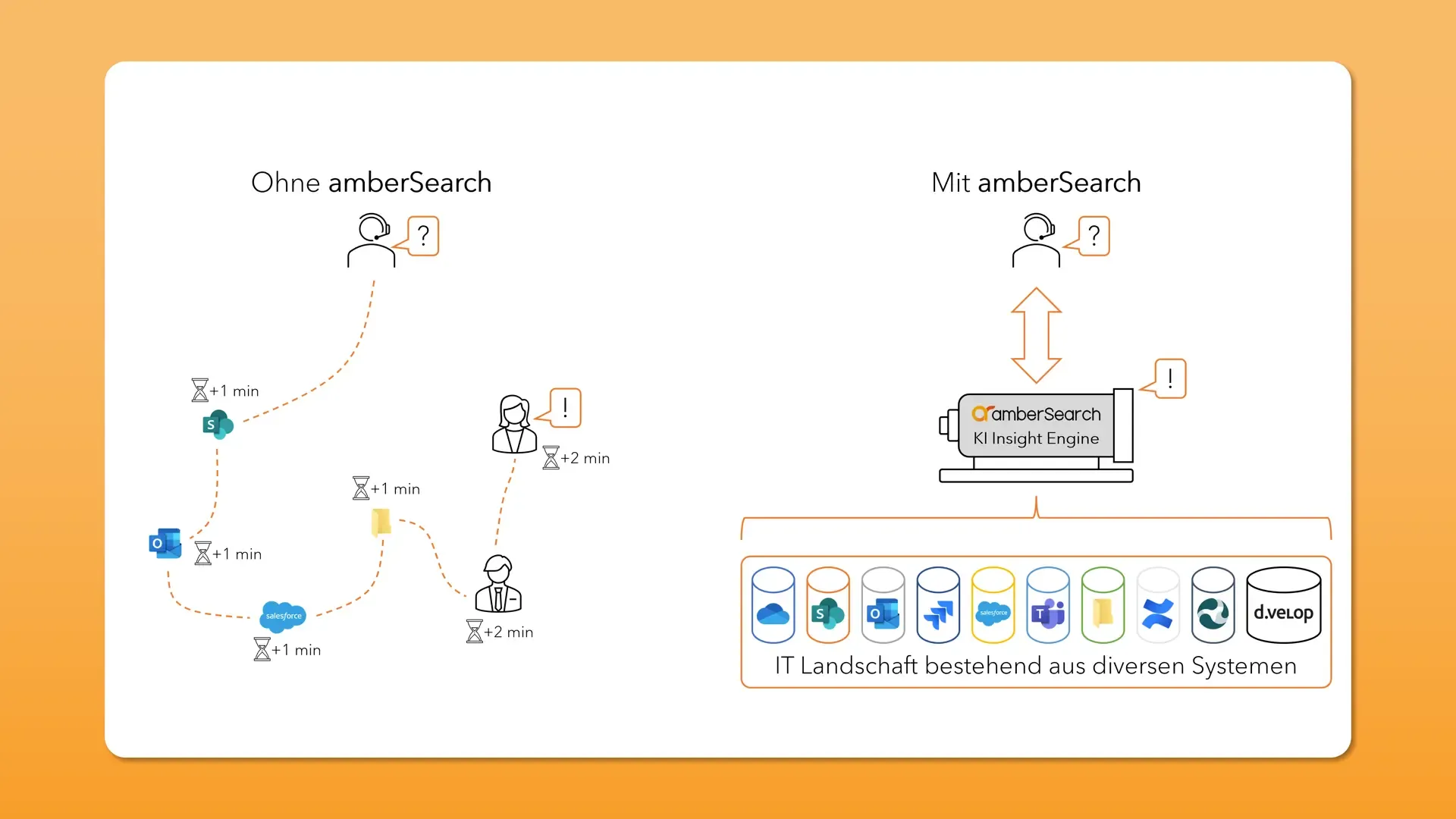
Unified search instead of searching system by system
Without enterprise search, employees search multiple systems one after another: first the network drive, then SharePoint, then their own mailbox, and finally they ask a colleague. The search capabilities of each system follow their own logic. People often stop at the first result that seems to fit, even if it is not the best or most current one.
With enterprise search, a single query searches all connected systems at once, through a single search interface and with a unified search experience. Search results are ranked by relevance, with the best information first, wherever it is stored. Think of it as a central information desk that opens every door at the same time and brings you the best result.
How it differs from intranet search and Google
Classic intranet search only finds what has been published on the intranet. Most knowledge, however, lives elsewhere: in file shares, mailboxes, chats and business applications. Enterprise search adds a layer on top of all these sources. The intranet then becomes one source among many.
Enterprise search is often compared with Google because the experience should feel just as simple. The task is a different one, though. On the web, Google ranks public websites partly through the links between pages. Inside a company there are hardly any such signals. Instead there are access rights, jargon, abbreviations and many versions of the same document. Why Google finds almost everything while internal search engines often find very little is explained in our article Why Google finds everything but your enterprise search engine barely finds anything.
How does a unified search work?
From the user's point of view, enterprise search is just a search bar. Behind it, a lot has changed technically in recent years, and not all search is the same. Three building blocks and one distinction are enough to understand the basics.
Connectors, index and permissions
- Connectors link the search to the data sources, for example SharePoint, Confluence, Outlook, Teams, network drives or a CRM. Integration runs through each system's interfaces: connectors read content and metadata and keep everything up to date, so new documents can be found quickly.
- The index is the search's directory. It stores text, metadata and, in AI solutions, the meaning of content in a way that answers a query within seconds, even across large volumes of documents.
- Permissions are taken over from the source systems, usually via directory services such as the company's user directory. Each person only sees what they could also open in the original system, and only authorised users see confidential content. Without this step, enterprise search could only cover content that is already shared with everyone. Proper access control is therefore not optional.

On top of these building blocks sits the search interface: a search bar in the browser, in Teams or in other applications, with filters by source, date or file type and a preview of each result.
Keyword, federated and intelligent search
Three quite different approaches to enterprise search technology share the same name:
- Keyword search finds documents that contain the words you typed. It is fast and transparent but struggles with synonyms, abbreviations and differently phrased questions, because it relies on exact keyword matches.
- Federated search sends the query to the built-in search of each system and collects the results. It needs no index of its own and no deep integration, but quality depends on every single system, and the results are hard to rank together.
- Intelligent search uses a shared index and AI methods that understand the meaning of a query. This semantic search, often based on vector search, also finds relevant documents in which the search terms do not literally appear.
What separates the three approaches in detail is covered in our comparison Keyword-based vs. federated vs. intelligent search. How organisations benefit from AI search in their daily work is explained in our article on smart search.
AI and RAG: answers instead of result lists
The latest development combines search with generative AI. With retrieval augmented generation (RAG), the search first finds the relevant passages in your own documents, then a large language model turns them into an answer and cites the sources. Instead of opening ten documents, you read a short answer and check the original if needed. For questions whose answer is spread across several documents, multi-hop question answering comes into play.

This makes search the foundation of every kind of AI support in the organisation: what the search cannot find, the AI cannot answer. Our articles Enterprise search as the basis for generative AI and What is generative AI search? explain why.
Important features
Many people assume that introducing enterprise search is a large integration project with a lot of custom work. It does not have to be. At R-Biopharm, the technical connection to Teams, Outlook and network drives was completed within half a day, in coordination with the company's IT department. As the R-Biopharm case study puts it:
The connection of amberSearch was actually as easy as originally discussed and enabled us to quickly activate the solution for the users.
Whichever vendor you choose, modern enterprise search platforms should offer these key features:
- Many data sources: connectors and straightforward integration for the systems your organisation actually uses, not only the Microsoft world.
- Inherited access rights: access rights make sure each person only sees the information they are meant to see. In the past, some providers only searched content that was open to everyone because they could not take over permissions. Today, a connection to the existing permission management is standard, and you should check it.
- Natural language queries: the experience people know from the web belongs inside the company too. Employees ask a question instead of guessing the right keywords.
- Relevance and freshness: relevant results come first, with the newest information on top, while duplicates and old versions move down. Good solutions also take the role and context of the person searching into account.
- Error tolerance: fuzzy search forgives typos, phonetic search evens out different spellings, and semantic search captures what a query means.
- Answers with sources: AI answers point to the documents they come from, so every statement can be checked.
- Filters, previews and people search: filters by system, period and file type, a preview without opening the file, and hints about who knows a topic well.
- Scalability: search stays fast as data volumes, sources and user numbers grow.
- Data security and privacy: hosting and processing should match your own compliance requirements. What matters under the GDPR is covered in our article on GDPR-compliant business AI.
- Close to daily work: search should be available where people already work, for example as a search bar in the browser or in Teams.
When do you need enterprise search?
Most employees know the frustration of searching the company's internal systems and not finding an answer. The questions they ask themselves are always the same:
- Which system should I search?
- What exactly should I search for?
- Who can I ask for help?
In recent years, organisations have added more and more IT systems, and data volumes keep growing. The result is a heterogeneous IT landscape and often several "logically correct" storage locations for the same information. Over time this turns into a kind of chaos that can no longer be fixed by restructuring folders. Data silos can rarely be dissolved, but they can be searched together without moving the data. Siloed search, one system at a time, is exactly what enterprise search systems replace.
Typical signs that a unified search would pay off:
- The same questions keep landing with the same people by email or chat.
- New starters take a long time to learn where things are.
- Documents are recreated because nobody can find the original.
- After growth or mergers, there are several parallel storage locations.
- An AI assistant is planned that should draw on internal knowledge.
The underestimated problem
Most employees are aware that they spend a lot of time searching for internal information. Managers and leadership often see it less clearly. Very few organisations measure search time, so the problem does not show up in any metric.

Where companies do ask, the numbers are clear. At the Krämmel Group, commercial staff estimate that they spend about 30 minutes a day searching for files and emails (Krämmel case study). At ENTECCOgroup, more than 70 per cent of employees said in an internal survey that they spend more than 15 minutes a day looking for information, and for more than 25 per cent it was over 30 minutes (ENTECCOgroup case study).
What searching costs
A simple calculation shows the order of magnitude: 30 minutes of searching a day adds up to about 110 hours a year per person, assuming 220 working days. How to measure the real figures for your organisation is shown in our two frameworks for capturing research time. Building on that, our guide explains step by step how to calculate a business case for enterprise search. For a quick estimate, use the ROI calculator.
Goals and benefits
The goal of enterprise search is higher productivity: employees should work more efficiently and be more satisfied with their IT systems. At a time of skills shortages, it matters that people spend their time on the actual work instead of hunting for files. At the same time, central search is a logical step towards the digital workplace.
The main benefits at a glance:
- Time: whoever finds things faster spends more time on the actual task.
- Onboarding: new colleagues get quick access to the organisation's knowledge without constantly having to ask.
- Better decisions: relevant information that is current and complete, rather than the first file that turns up.
- Less duplicated work: existing proposals, analyses and solutions get reused.
- Knowledge sharing across silos: what one department documents helps others too and stays findable when people leave.
- A foundation for AI: good search is the prerequisite for AI assistants and agents that work with internal knowledge.
Which soft factors also belong in the assessment is covered in the business case guide.
Use cases by system
Enterprise search shows its value where the built-in search of individual systems reaches its limits. These articles go deeper:
SharePoint and Microsoft 365
SharePoint structures that have grown over years are hard to search for many teams. How to improve search there is explained in Optimise SharePoint search.
Confluence and Jira
Large Confluence spaces and Jira projects hold a lot of project knowledge that the built-in search struggles to surface. Tips are in Optimise Confluence search, and how to search both systems together is covered in Search Jira and Confluence with amberSearch.
Outlook and email
Many agreements and decisions live in mailboxes. How AI improves search there is described in Outlook search optimisation.
Network drives
In many organisations, most data still sits on network drives. How to search them efficiently is explained in Network drive search.
Use cases by department
From sales and service to HR: our overview of 12 enterprise search use cases shows where search helps in everyday work.
Choosing and implementing software
Once it is clear that enterprise search makes sense, two steps follow: finding the right solution and introducing it so that people actually use it.
Choosing: Enterprise search solutions differ in connectors, permissions, AI features, hosting and target group. Some search platforms are aimed at developer teams building their own search, while other enterprise search tools are ready-made applications for business teams. The market ranges from open-source technology that serves as a base for custom solutions to finished software. Solutions run as a cloud service (SaaS), as a platform for your own development (PaaS), in your own data centre or as a hybrid. Which enterprise search software fits depends on your systems, your team and your data protection requirements. Our guide Enterprise search solutions compared gives an overview of vendors and criteria. For conversations with vendors, use our checklist for choosing an enterprise search.
Implementing: In an enterprise search implementation, the technical connection is usually the smaller part. More attention goes to data sources, data quality, roles, internal resources, key users and user onboarding. How to do this in three phases is explained in our guide on how to implement enterprise search.
Customer examples
These amber projects show what unified search looks like in practice:
- ENTECCOgroup (mechanical engineering, air pollution control): after several mergers, terabytes of data were spread across different systems and drives. Besides network drives, Outlook, Teams, OneDrive, SharePoint and OneNote were connected. More in the ENTECCOgroup case study.
- R-Biopharm (biotechnology): sales and service teams were searching for certificates, guidelines and information in Teams and Outlook, sometimes for ten minutes or more. The technical connection took half a day. More in the R-Biopharm case study.
- Siemens Energy (energy technology): after winning the Digital Info Management Challenge, amberSearch was developed further in a real-world environment, with the aim of letting all employees find documents quickly. More in the Siemens Energy case study.
- Müller Maschinentechnik (mechanical engineering): with Teams and hybrid working, more was documented but it also became harder to keep track. The focus was on the field service team, who previously often had to check with the back office, engineering and project management. More in the Müller Maschinentechnik case study.
You will find more projects on our customers page.
Frequently asked questions
What is enterprise search in simple terms?
A search engine for your own organisation. It searches every connected system with one query and shows each person only the results they are authorised to see.
What is the difference between enterprise search and intranet search?
Intranet search only finds content published on the intranet. Enterprise search also covers network drives, mailboxes, chats, wikis and business applications. The intranet becomes one of many sources.
What is the difference between enterprise search and Elasticsearch?
Elasticsearch is a search and analytics engine from the vendor Elastic, in other words a technology that developer teams use to build their own search applications. Enterprise search describes the use case: searching across all internal sources. An enterprise search can be built on such an engine or used as ready-made enterprise search software.
How does enterprise search improve productivity?
Implementing enterprise search cuts the time employees spend searching and asking around, and it prevents work from being done twice. How big the effect is depends on how much time people spend searching today, which is why it is worth measuring before you start.
Which sources can enterprise search cover?
Typical sources are file storage such as network drives, SharePoint and OneDrive, email mailboxes, chats in Teams, wikis such as Confluence, ticketing systems such as Jira and business applications such as CRM or ERP. Which systems can be connected depends on the vendor's connectors.
Is enterprise search GDPR-compliant?
That depends on the solution. What matters is whether access rights are inherited, where hosting and processing take place, whether there is a data processing agreement and whether data is used to train AI models.
Find knowledge with amberSearch
amberSearch is one of several enterprise search solutions on the market. With amberSearch, you find answers across all connected sources, with your existing access rights and with sources cited.
Find answers in seconds: try it free for 30 days
For a first impression, watch our two-minute product video. Want to see how this works with your own systems? Then book a demo. All articles on searching inside the organisation are collected in our enterprise search topic overview.