

Company knowledge sits in SharePoint, Confluence, network drives, emails and ticketing systems. Each system has its own search, and none of them knows about the others. Enterprise search software puts one search layer across all of these data sources and today often delivers answers with source references as well. What enterprise search is and how it works in principle is covered in our guide What is enterprise search?.
This guide goes one step further: it shows what a solution needs to deliver, compares six well-known enterprise search vendors based on their own information, and helps you with selection, purchasing and security questions.
Table of Contents
Key points at a glance
- One search bar for all systems: Enterprise search software connects data sources via connectors, builds a search index and shows each person only what they are allowed to see.
- Answers instead of result lists: Modern AI-powered enterprise search tools combine full-text search, semantic search and generative AI. Good solutions always name the source.
- Vendors differ widely: Some deliver a ready-to-use application for employees, others a platform on which your IT team builds its own search. This is the most important distinction in any comparison.
- Security is part of the decision: Permission handling, data location, certifications such as ISO 27001 and how training data is handled belong on every shortlist.
- Testing beats data sheets: A pilot with real data and real questions shows faster than any presentation whether an enterprise search fits.
What enterprise search software needs to deliver
Enterprise search software makes internal knowledge, much of it unstructured data in internal documents and emails, findable across system boundaries. It does not replace existing applications but sits on top of them as a search layer: documents stay in SharePoint, tickets in Jira, contracts in the document management system. How connectors, index and permissions work together in detail is explained in our enterprise search guide.
The need is similar in almost every organisation. According to a McKinsey Global Institute study from 2012, knowledge workers spend nearly 20 per cent of their working week searching for internal information or tracking down colleagues who can help. On top of that come data silos, duplicated work and know-how that disappears when experienced employees retire.

Key features of an enterprise search platform
Whichever vendor you choose, a solution should offer these features:
- Natural language search: Employees ask questions the way they would ask a colleague and get relevant information without search operators or exact file names.
- Hybrid search: Combining full-text search (exact terms, part numbers) with semantic search (meaning, synonyms, other languages) delivers the best results.
- Answers with sources: With retrieval augmented generation, a language model writes an answer based on the documents found and links to the passages it used.
- Permission inheritance: The software takes over access rights from the source systems. If you cannot open a document in SharePoint, you will not see it in the search results either.
- Part of the daily workflow: Enterprise search is available where people work, for example in Microsoft Teams, in the browser or in Outlook.
- Analytics: Search trends, usage and feedback show where knowledge is missing and where results need to improve.

Intranet, file search or enterprise search?
The intranet question comes up in almost every selection process. The two serve different purposes:
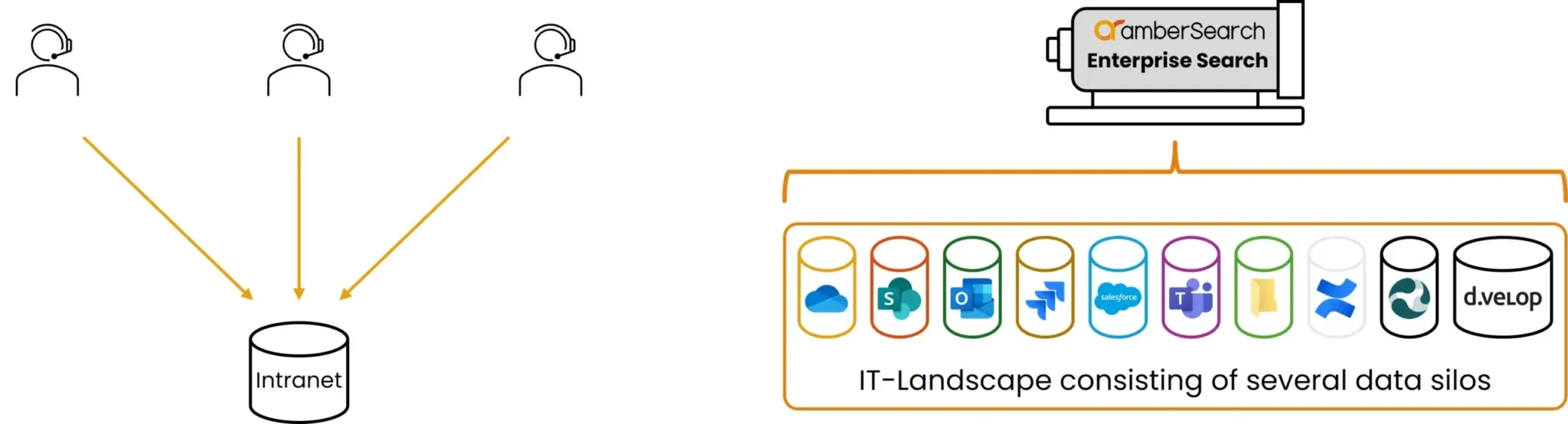
- Intranet: A place where employees find news, policies and selected information. Intranets are maintained editorially and are therefore rarely fully up to date. Operational knowledge still lives in project folders, emails and tickets. From an IT perspective, an intranet is just another data silo.
- Enterprise search software: An enterprise search engine across all connected systems. Nobody uploads content; the software pulls it from the sources and keeps it current. It is not a new repository but a central point of access to the existing ones, and a building block of modern knowledge management.
The built-in search of individual systems, such as file search on a network drive or SharePoint search, is also limited to one system. Only a company-wide search across all sources shows what actually exists in the organisation. How to get the most out of Microsoft search is covered in our article on optimising SharePoint search.
Enterprise search vendors compared
The market for enterprise search solutions is broad. Here we compare six vendors that come up frequently in selection projects: Elasticsearch, Splunk, Microsoft Azure AI Search, Glean, Coveo and our own product amberSearch. All information comes from the vendors' websites and documentation, as of 5 November 2026. Features and offerings change quickly, so check the details with each vendor before you decide. We do not list prices because they depend on the number of users, data volume and contract terms.
The key distinction: is the product a ready-to-use application for employees or a platform on which development teams build their own search and AI applications?
| Vendor | Type of solution | Hosting and data location | Search and AI features | Connecting sources | Permissions | Focus according to vendor |
|---|---|---|---|---|---|---|
| Elasticsearch (Elastic) | Platform: search and analytics engine, source code available under the open source AGPLv3 licence among others | self-managed (on-premises, Kubernetes) or Elastic Cloud on AWS, Google Cloud and Azure | vector search, semantic and hybrid search, reranking, RAG, Agent Builder | more than 350 integrations and connectors | depends on your own implementation | development teams building their own search applications |
| Splunk (Cisco) | Platform for security and observability | Splunk Cloud Platform, in Europe including Frankfurt, Dublin, Paris and London | AI-driven data platform for security and observability | not the focus of the pages reviewed | not described on the pages reviewed | security, IT and engineering teams |
| Microsoft Azure AI Search | Platform: managed cloud service for search and RAG, foundation of Foundry IQ | Azure cloud, region of your choice, in Europe including Germany West Central, West Europe and UK South | full-text, vector, hybrid and multimodal search, agentic retrieval | indexers for Azure Blob Storage, Cosmos DB, SharePoint, OneLake and more | Microsoft Entra ID, document-level access control | development teams working with Azure |
| Glean | Ready-to-use application: platform for search, assistant and agents | multi-cloud, data location not stated on the pages reviewed | search, AI assistant, agents, choice of more than 40 language models | more than 275 connectors | source system permissions are inherited; ISO 27001, SOC 2 Type II, ISO 42001 | AI platform for working with company knowledge |
| Coveo | Platform for AI search and relevance | data residency in Europe available via the Ireland region | AI search, recommendations, generative answers | more than 100 content sources | not described on the pages reviewed; ISO 27001, SOC 2 | commerce, service, website and workplace |
| amberSearch (amber) | Ready-to-use application: AI search with an answer layer | T Cloud data centres in Germany and the EU | hybrid search (keyword, semantic, vector), answers with source references, several language models | more than 70 connectors | source system permissions are inherited; ISO 27001 | mid-sized companies |
Elasticsearch: an open source foundation for your own search applications
Elastic describes Elasticsearch as a distributed search and analytics engine for structured, unstructured and vector data. For AI use cases, the engine offers vector search, semantic and hybrid search, reranking and building blocks for RAG and agents. According to Elastic's licensing FAQ, the source code is available under AGPLv3, SSPL and Elastic License 2.0; AGPLv3 is an OSI-approved open source licence. You can run Elasticsearch yourself or use Elastic Cloud.
What matters for your selection: Elasticsearch is a toolkit. Elastic deprecated its former ready-made workplace search product, Workplace Search, with version 9.0 and recommends building directly on Elasticsearch (Elastic Enterprise Search FAQ). The search interface, permission model and connector logic are therefore built by your own team or a service provider. This suits organisations with in-house development capacity that want full control.
Splunk: the specialist for security and observability
Splunk is now part of Cisco and positions itself as a platform that brings security and observability together. According to the vendor, its target groups are SecOps, ITOps and engineering teams that want to protect systems and resolve issues quickly. According to the service description, Splunk Cloud Platform is available in several European regions, including Frankfurt and London.
For your selection, this means: Splunk is the obvious candidate when security and operational data are the priority. A knowledge search for all employees across documents, emails and wikis is not the focus of the vendor pages we reviewed. If you need both, you will usually plan for two tools.
Microsoft Azure AI Search: a search service for developers on Azure
Microsoft describes Azure AI Search as a fully managed cloud service that connects enterprise data to AI. It offers classic search and agentic retrieval for RAG scenarios, full-text, vector, hybrid and multimodal queries, and indexers for sources such as Azure Blob Storage, Cosmos DB, SharePoint and OneLake. Access control runs through Microsoft Entra ID, including at document level. The service also underpins Foundry IQ, the knowledge layer for agents in Microsoft Foundry.
You choose the region for your data yourself. According to the list of supported regions, European options include UK South, Germany West Central, West Europe, North Europe and Switzerland North; not every feature is available in every region. Azure AI Search is a developer service, managed via the portal, REST API and SDKs, so the search application for employees is built in your own project.
Glean: an AI platform for search, assistant and agents
Glean describes itself as an enterprise AI platform that combines search, a personal AI assistant and agents. According to the vendor, more than 275 connectors are available, and permissions from source systems are inherited and synchronised in real time. The security page lists ISO 27001, ISO 42001 and SOC 2 Type II, among others. Glean selects from more than 40 language models depending on the task and offers APIs for your own extensions.
The pages we reviewed do not state where data is hosted. If EU or UK hosting is a must for you, clarify this with the vendor.
Coveo: AI relevance for customer experience and the workplace
Coveo describes itself as an AI-Relevance Platform for search, recommendations and agentic experiences. Its use cases are commerce, service, website and workplace, covering customer touchpoints as well as internal search. Coveo cites more than 100 connectable content sources, generative answers based on a unified index, and ISO 27001 and SOC 2 certifications. For data residency in Europe, Coveo offers the Ireland region according to its documentation.
This makes Coveo particularly interesting if your customer portal, online shop and internal search are meant to run on one shared platform.
amberSearch: AI search for mid-sized companies
amberSearch is our own product, so we stick to verifiable facts here. amberSearch searches more than 70 connected sources with a single query and combines keyword, semantic and vector search. An AI answer layer always points to the passage in the document that the answer comes from. Permissions from systems such as SharePoint, Confluence or network drives are inherited. Employees use the search on the web, through a Teams app, an Outlook add-in or a Chrome extension (amber facts).
On security and data protection: the platform and index run in T Cloud data centres in Germany and the EU, amber operates an ISMS audited against ISO 27001, and the product is designed to meet the requirements of the EU AI Act (security at amber). Customer data is not used to train AI models. You can try the solution free for 30 days.
Which type of solution suits you?
- You have your own development team and want a tailored search, for example inside a customer application: platforms such as Elasticsearch or Azure AI Search give you the building blocks of your own enterprise search platform.
- Your focus is logs and security data: Splunk is the right tool here.
- You want to connect search across customer portal, shop and intranet: Coveo covers this combination.
- You want a ready-to-use knowledge search for all employees that connects existing systems and inherits permissions: then compare applications such as Glean and amberSearch, looking at connectors, data location and support.
Selection criteria: what to look for
Which of the enterprise search solutions fits you depends less on feature lists than on your systems, your data and your security requirements. In every case, check usability, AI capabilities, integration with your systems, security and permissions, scalability, speed, and whether the search shows up in daily work where your teams actually are. All criteria, with questions to ask vendors, are in our checklist for choosing an enterprise search.
The key points in brief:
| Criterion | Why it matters | How to check it |
|---|---|---|
| Answer quality | Employees want answers, not lists of documents | Pilot with real questions from your daily work |
| Connectors | Without connections to your systems, knowledge stays invisible | Compare the connector list with your system landscape |
| Permission inheritance | Protects confidential content | Test searches with accounts from different departments |
| Data location and certifications | GDPR and internal policies | Ask for data centre location, ISO 27001 and a data processing agreement |
| Multilingual search | International teams search in their own language | Test with documents in several languages |
| Support | Decides whether people keep using it after launch | Clarify contacts, response times and onboarding |
Cloud or on-premises
The deployment model affects effort, cost and control:
| Aspect | Cloud | On-premises |
|---|---|---|
| Go-live | within weeks | usually months |
| IT effort | low | high |
| Running costs | predictable | depends on operations and staff |
| Control over infrastructure | with the vendor | fully in-house |
| Scaling | easy | complex |
| Security and compliance | depends on vendor and contract | your own responsibility |
For most mid-sized companies, a cloud solution is the faster route, provided that data location, certifications and contract terms meet your requirements.
Integrations and connectors
Enterprise search is only as good as its connections to your systems. Technically, there are three basic approaches:
- Federated search: The software passes the query on to the search functions of the connected systems and merges the results. This is quick to set up, but quality depends on the weakest individual search.
- Keyword-based index: The software builds its own search index and ranks hits by frequency and position of the search terms, often enhanced with language processing.
- Semantic search: Using machine learning, a language model captures the meaning of texts and stores it in a vector index. This lets the search engine find content that uses different words. It usually delivers the best results but also needs the most computing power.
Our article keyword-based vs. federated vs. intelligent search explains the differences in detail. Modern solutions usually combine an index with semantic search to form a hybrid search.
For enterprise search to work, each of your data sources needs a connector that reads content and access rights. Typical sources are:
- Microsoft 365: SharePoint, OneDrive, Teams, Outlook and Exchange
- Google Workspace: Google Drive and Gmail
- Knowledge and project tools: Confluence, Jira, wikis
- File storage: network drives and file servers, document management systems
- Business applications: CRM such as Salesforce or HubSpot, ERP and industry software
- File formats: Word, PDF, PowerPoint, Excel, emails, scanned documents with text recognition
Not every enterprise search solution supports every system. Compare the connector list with your system landscape before you decide, and ask how specialist systems are connected, for example via API.
The other direction, the front end, matters just as much, because the search experience decides adoption: a search that only runs in a separate web application gets used less than one that appears in Teams, in the browser or on the intranet.
Security, GDPR and the EU AI Act
An enterprise search can potentially see everything stored in your organisation. Security is therefore not an add-on but a basic requirement. Clarify these points with every vendor:
- ISO 27001: The international standard for information security. Certification means the vendor's security management is regularly audited by an independent body. Ask about the scope of the certificate.
- GDPR: Clarify where data is stored and processed, who can access it, how data is deleted and whether a data processing agreement is in place. More on this in our article on GDPR-compliant business AI.
- EU AI Act: The EU regulation on artificial intelligence sets requirements for transparency and human oversight. Ask how the vendor meets them.
- No training on your data: With RAG, no model needs to be trained on your content. Get written confirmation that your data will not be used to train models, including by third parties.
- Permission inheritance and audit logs: Enterprise search must take over access rights from the source systems and log who accessed which content and when.
Warning sign: a vendor cannot say clearly where your data is stored and which models process it.
Purchasing: make or buy, costs and trial
Build or buy?
Before you buy comes the make-or-buy decision. A first prototype on a platform such as Elasticsearch or Azure AI Search can often be built quickly. The effort comes afterwards: maintaining connectors, synchronising permissions, improving answer quality, operations, support and further development. If you do not want to plan a dedicated team for this, a standard solution is usually cheaper and faster.
What drives the cost
The cost of enterprise search software depends mainly on the number of users, data volume, required connectors, deployment model and the scope of AI features. With platforms, infrastructure and development time come on top. So compare not just licence prices but total cost over several years. Prices for amberSearch are on our pricing page.
Does it pay off?
The benefit comes mainly from time saved searching, faster onboarding and fewer questions to subject experts. Our guide to calculating a business case for enterprise search shows how to work this out with your own figures. For a quick estimate, use the ROI calculator.
A pilot instead of a pitch
Test your favourites with real data. Choose a clear use case, for example service, sales or engineering, connect the most important systems and let employees from different departments ask their real questions. Measure before and after how long searching takes and how often the solution is used.
Implementation in brief
Once the decision is made, implementation usually runs in three phases: technical setup, including connecting the systems and the identity provider; indexing the data alongside a workshop with selected key users; and finally the rollout with a short onboarding for everyone. How long the phases take, which resources you need and how to embed usage in everyday work is covered in our guide on how to implement an enterprise search.
Three developments that change the selection
- Answers become standard: Almost every vendor is adding generative AI to its search platform. The question is no longer whether AI answers exist but how reliable and traceable they are. Why enterprise search is the best foundation for AI in your organisation is explained in our article on enterprise search as the basis for generative AI.
- From search to AI agents: Several vendors, including Elastic, Microsoft and Glean, are building features for agents that do not just answer but complete tasks. The foundation remains an enterprise search engine that knows permissions and sources.
- Compliance becomes a selection criterion: GDPR and the EU AI Act turn data location, transparency and logging into hard requirements, especially for European companies.
Frequently asked questions
What is enterprise search software?
Enterprise search software is an application that makes content from many of an organisation's systems searchable, such as SharePoint, Confluence, network drives and emails. It inherits the access rights of the sources and today often also provides AI answers with source references.
Which enterprise search tools are available?
There are platforms for development teams, such as Elasticsearch or Microsoft Azure AI Search, and ready-to-use applications for employees, such as Glean or amberSearch. In addition, some vendors have a specific focus, for example Splunk on security and observability and Coveo on search in customer-facing channels. The comparison above shows the differences.
Is searching with amberSearch GDPR-compliant?
amberSearch is GDPR-compliant and ISO 27001 certified. The platform and index run in data centres in Germany and the EU, and customer data is not used to train AI models. Details are on our security page.
Which systems and data sources can be connected?
amberSearch offers more than 70 connectors, including Microsoft 365, SharePoint, Confluence, Jira, Salesforce and network drives. The full list is in the connector overview.
How does amberSearch differ from open source solutions such as Elasticsearch?
Elasticsearch is a search engine on which development teams build their own applications. Interface, connectors and permission model are created in your own project. amberSearch is a ready-to-use application that connects systems via standard connectors, inherits permissions and delivers answers with sources. If you have full technical control and in-house capacity, Elasticsearch serves you well; if you need a knowledge search for everyone quickly, a ready-made solution does.
Will my data be used to train AI models?
Not with amberSearch. Answers are generated with retrieval augmented generation: the language model only receives the question and the relevant passages and is not trained on them. With other vendors, clarify this point in the contract.
How much does an enterprise search cost?
That depends on the number of users, data volume, connectors, deployment model and scope of AI features. Open source platforms have no licence fees for the core, but you pay for infrastructure, development and operations. Ask each vendor for a quote for your specific case. Prices for amberSearch are on the pricing page.
Try amberSearch for free
Want to see how enterprise search works with your own data sources? Find out more on the amberSearch product page. You can try amberSearch free for 30 days, no credit card required, or see it in a personal demo.
Try it free for 30 days or book a demo
You will find more articles on the topic in our enterprise search topic overview.