
Enterprise Search
What is Enterprise Search? Definition, How It Works and Benefits
What enterprise search is, how a unified search across the organisation works and how to tell whether you need one.

Most organisations know the problem: the information exists, but nobody can find it. Contracts sit on a network drive, project knowledge in SharePoint, agreements in Teams, customer data in the CRM and decisions in email threads. Anyone looking for something sets off on a tour of multiple systems and tools, from document management systems to chat, and often stops at the first piece of information that looks good enough. Knowledge is rarely missing. Access to it is.
This is exactly where enterprise search comes in. This article explains in plain language what enterprise search is, how a unified search across the company works, which features matter and how to tell whether your organisation needs one. Enterprise search is one building block of knowledge management: it makes sure that existing knowledge is actually found.
Key takeaways
Enterprise search definition: explained simply
Enterprise search is a central search technology that makes all of an organisation's internal data sources searchable through a single search bar. It finds documents, emails, chats and records regardless of where they are stored or what format they are in, and shows each person only what they are allowed to see.
Put even more simply: enterprise search is a search engine for your own company, which is why the term enterprise search engine is also common. Unlike a basic file search, it does not just look at folders and file names but understands content in many different formats. It covers structured data, such as customer data in a CRM (customer relationship management) system or records in an ERP and other databases, as well as unstructured data such as presentations, reports, minutes, manuals or drawings.
To do this, modern solutions use artificial intelligence methods such as machine learning and natural language processing (NLP). The goal stays the same: employees should find the relevant information they need for their work faster.
"Enterprise" here simply means a company or organisation. So enterprise search is search inside an organisation. It is neither web search nor site search, which covers the pages of your own public website.
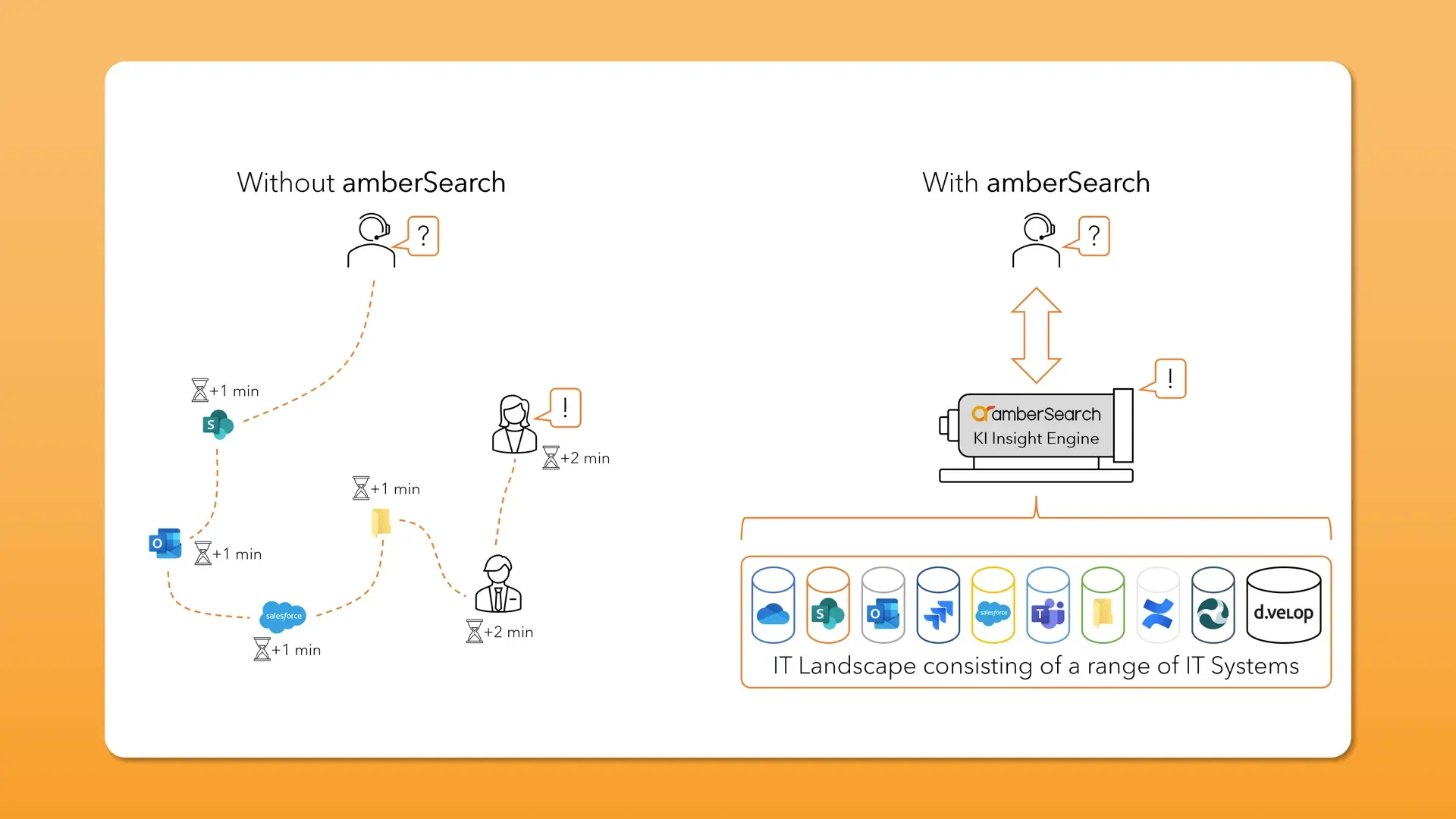
Unified search instead of searching system by system
Without enterprise search
- Employees search multiple systems one after another: first the network drive, then SharePoint, then their own mailbox, and finally they ask a colleague.
- The search capabilities of each system follow their own logic.
- People often stop at the first result that seems to fit, even if it is not the best or most current one.
With enterprise search
- A single query searches all connected systems at once, through a single search interface and with a unified search experience.
- Search results are ranked by relevance, with the best information first, wherever it is stored.
Think of it as a central information desk that opens every door at the same time and brings you the best result.
How it differs from intranet search and Google
Classic intranet search only finds what has been published on the intranet. Most knowledge, however, lives elsewhere: in file shares, mailboxes, chats and business applications. Enterprise search adds a layer on top of all these sources. The intranet then becomes one source among many.
Enterprise search is often compared with Google because the experience should feel just as simple. The task is a different one, though. On the web, Google ranks public websites partly through the links between pages. Inside a company there are hardly any such signals. Instead there are access rights, jargon, abbreviations and many versions of the same document. Why Google finds almost everything while internal search engines often find very little is explained in our article Why Google finds everything but your enterprise search engine barely finds anything.
How does a unified search work?
From the user's point of view, enterprise search is just a search bar. Behind it, a lot has changed technically in recent years, and not all search is the same. Three building blocks and one distinction are enough to understand the basics.
Connectors, index and permissions

On top of these building blocks sits the search interface: a search bar in the browser, in Teams or in other applications, with filters by source, date or file type and a preview of each result.
Keyword, federated and intelligent search
Three quite different approaches to enterprise search technology share the same name:
- Keyword search
- Finds documents that contain the words you typed. It is fast and transparent but struggles with synonyms, abbreviations and differently phrased questions, because it relies on exact keyword matches.
- Federated search
- Sends the query to the built-in search of each system and collects the results. It needs no index of its own and no deep integration, but quality depends on every single system, and the results are hard to rank together.
- Intelligent search
- Uses a shared index and AI methods that understand the meaning of a query. This semantic search, often based on vector search, also finds relevant documents in which the search terms do not literally appear.
What separates the three approaches in detail is covered in our comparison Keyword-based vs. federated vs. intelligent search. How organisations benefit from AI search in their daily work is explained in our article on smart search.
AI and RAG: answers instead of result lists
The latest development combines search with generative AI. With retrieval augmented generation (RAG), the search first finds the relevant passages in your own documents, then a large language model turns them into an answer and cites the sources. Instead of opening ten documents, you read a short answer and check the original if needed. For questions whose answer is spread across several documents, multi-hop question answering comes into play.

This makes search the foundation of every kind of AI support in the organisation: what the search cannot find, the AI cannot answer. Our articles Enterprise search as the basis for generative AI and What is an AI search engine? explain why.
Important features
Many people assume that introducing enterprise search is a large integration project with a lot of custom work. It does not have to be. At R-Biopharm, the technical connection to Teams, Outlook and network drives was completed within half a day, in coordination with the company's IT department. As the R-Biopharm case study puts it:
The connection of amber was actually as easy as originally discussed and enabled us to quickly activate the solution for the users.
Whichever vendor you choose, modern enterprise search platforms should offer these key features:
When do you need enterprise search?
Most employees know the frustration of searching the company's internal systems and not finding an answer. The questions they ask themselves are always the same:
- Which system should I search?
- What exactly should I search for?
- Who can I ask for help?
In recent years, organisations have added more and more IT systems, and data volumes keep growing. The result is a heterogeneous IT landscape and often several "logically correct" storage locations for the same information. Over time this turns into a kind of chaos that can no longer be fixed by restructuring folders. Data silos can rarely be dissolved, but they can be searched together without moving the data. Siloed search, one system at a time, is exactly what enterprise search systems replace.
Typical signs that a unified search would pay off:
- The same questions keep landing with the same people by email or chat.
- New starters take a long time to learn where things are.
- Documents are recreated because nobody can find the original.
- After growth or mergers, there are several parallel storage locations.
- An AI assistant is planned that should draw on internal knowledge.
The underestimated problem
Most employees are aware that they spend a lot of time searching for internal information. Managers and leadership often see it less clearly. Very few organisations measure search time, so the problem does not show up in any metric.

- a day that commercial staff at the Krämmel Group estimate they spend searching for files and emails
- ~30 min
- of ENTECCOgroup employees spend more than 15 minutes a day looking for information
- 70 %+
- of ENTECCOgroup employees spend more than 30 minutes a day on it
- 25 %+
Where companies do ask, the numbers are clear. At the Krämmel Group, commercial staff estimate that they spend about 30 minutes a day searching for files and emails (Krämmel case study). At ENTECCOgroup, more than 70 per cent of employees said in an internal survey that they spend more than 15 minutes a day looking for information, and for more than 25 per cent it was over 30 minutes (ENTECCOgroup case study).
What searching costs
A simple calculation shows the order of magnitude: 30 minutes of searching a day adds up to about 110 hours a year per person, assuming 220 working days. How to measure the real figures for your organisation is shown in our two frameworks for capturing research time. Building on that, our guide explains step by step how to calculate a business case for enterprise search. For a quick estimate, use the ROI calculator.
Goals and benefits
The goal of enterprise search is higher productivity: employees should work more efficiently and be more satisfied with their IT systems. At a time of skills shortages, it matters that people spend their time on the actual work instead of hunting for files. At the same time, central search is a logical step towards the digital workplace.
The main benefits at a glance:
Which soft factors also belong in the assessment is covered in the business case guide.
Use cases by system
Enterprise search shows its value where the built-in search of individual systems reaches its limits. These articles go deeper:
- SharePoint and Microsoft 365
- SharePoint structures that have grown over years are hard to search for many teams. How to improve search there is explained in Optimise SharePoint search.
- Confluence and Jira
- Large Confluence spaces and Jira projects hold a lot of project knowledge that the built-in search struggles to surface. Tips are in Optimise Confluence search, and how to search both systems together is covered in Search Jira and Confluence with amber.
- Outlook and email
- Many agreements and decisions live in mailboxes. How AI improves search there is described in Outlook search optimisation.
- Network drives
- In many organisations, most data still sits on network drives. How to search them efficiently is explained in Network drive search.
- Use cases by department
- From sales and service to HR: our overview of 12 enterprise search use cases shows where search helps in everyday work.
Choosing and implementing software
Once it is clear that enterprise search makes sense, two steps follow: finding the right solution and introducing it so that people actually use it.
Choosing
Enterprise search solutions differ in connectors, permissions, AI features, hosting and target group. Some search platforms are aimed at developer teams building their own search, while other enterprise search tools are ready-made applications for business teams. The market ranges from open-source technology that serves as a base for custom solutions to finished software. Solutions run as a cloud service (SaaS), as a platform for your own development (PaaS), in your own data centre or as a hybrid.
Which enterprise search software fits depends on your systems, your team and your data protection requirements. Our guide Enterprise search solutions compared gives an overview of vendors and criteria. For conversations with vendors, use our checklist for choosing an enterprise search.
Implementing
In an enterprise search implementation, the technical connection is usually the smaller part. More attention goes to data sources, data quality, roles, internal resources, key users and user onboarding. How to do this in three phases is explained in our guide on how to implement enterprise search.
Customer examples
These amber projects show what unified search looks like in practice:
- Mechanical engineering, air pollution control
ENTECCOgroup
After several mergers, terabytes of data were spread across different systems and drives. Besides network drives, Outlook, Teams, OneDrive, SharePoint and OneNote were connected.
Read the case study - Biotechnology
R-Biopharm
Sales and service teams were searching for certificates, guidelines and information in Teams and Outlook, sometimes for ten minutes or more. The technical connection took half a day.
Read the case study - Energy technology
Siemens Energy
After winning the Digital Info Management Challenge, amber was developed further in a real-world environment, with the aim of letting all employees find documents quickly.
Read the case study - Mechanical engineering
Müller Maschinentechnik
With Teams and hybrid working, more was documented but it also became harder to keep track. The focus was on the field service team, who previously often had to check with the back office, engineering and project management.
Read the case study
You will find more projects on our customers page.
Find knowledge with amber
amber is one of several enterprise search solutions on the market. With amber, you find answers across all connected sources, with your existing access rights and with sources cited.
For a first impression, watch our two-minute product video. Want to see how this works with your own systems? Then book a demo. All articles on searching inside the organisation are collected in our enterprise search topic overview.
Frequently asked questions about enterprise search
What is enterprise search in simple terms?
A search engine for your own organisation. It searches every connected system with one query and shows each person only the results they are authorised to see.
What is the difference between enterprise search and intranet search?
Intranet search only finds content published on the intranet. Enterprise search also covers network drives, mailboxes, chats, wikis and business applications. The intranet becomes one of many sources.
What is the difference between enterprise search and Elasticsearch?
Elasticsearch is a search and analytics engine from the vendor Elastic, in other words a technology that developer teams use to build their own search applications. Enterprise search describes the use case: searching across all internal sources. An enterprise search can be built on such an engine or used as ready-made enterprise search software.
How does enterprise search improve productivity?
Implementing enterprise search cuts the time employees spend searching and asking around, and it prevents work from being done twice. How big the effect is depends on how much time people spend searching today, which is why it is worth measuring before you start.
Which sources can enterprise search cover?
Typical sources are file storage such as network drives, SharePoint and OneDrive, email mailboxes, chats in Teams, wikis such as Confluence, ticketing systems such as Jira and business applications such as CRM or ERP. Which systems can be connected depends on the vendor's connectors.
Is enterprise search GDPR-compliant?
That depends on the solution. What matters is whether access rights are inherited, where hosting and processing take place, whether there is a data processing agreement and whether data is used to train AI models.