
Guide
Text-to-SQL With AI: How to Connect Your Database and Turn It Into a Strategic Lever
How to connect SQL databases to AI without code, query them in natural language, and use the results as charts or PowerPoint slides.

In most companies, valuable knowledge sits not only in SharePoint folders, file shares, or email inboxes, but also in SQL databases. CRM systems, ERP modules, support tools, product analytics: every day, millions of rows are generated there – rows that, in theory, contain all the answers management needs to make decisions. In practice, however, accessing this data remains a bottleneck: BI teams are overloaded, reports are outdated before they are distributed, and business units wait days for a simple analysis.
This is exactly where text-to-SQL is rewriting the rules. Those who connect SQL databases to an AI platform give every person in the organization the ability to talk to their own data in natural language – and receive the result as a chart, table, or PowerPoint slide. This has a massive impact on speed, decision quality, and the data culture across the company. amber is the solution that connects not only to your databases but also to your shares, archives and more. Find a full overview of all integrations here.
Why Text-to-SQL Now: Becoming a Data-Driven Organization
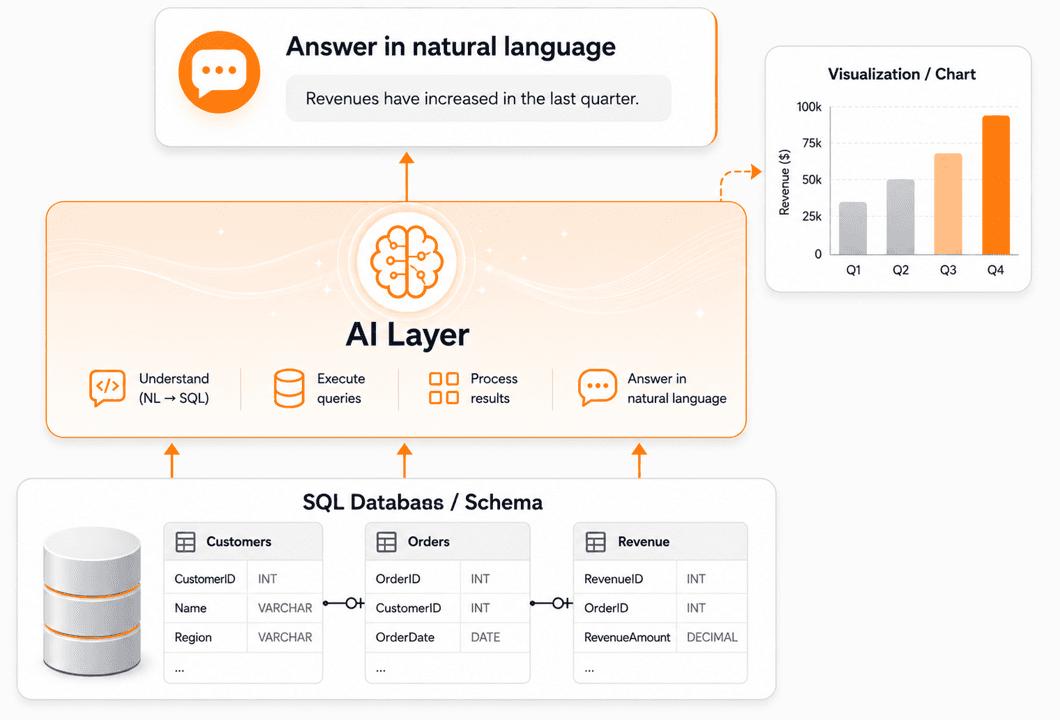
Databases hold a wealth of valuable information that cannot be compared to the information found in documents. On top of these databases, companies typically run Business Intelligence tools, which have done a solid job for static, recurring dashboards. But they are poor at handling “quick” ad-hoc questions. Given the number of users who need access to internal data today, these tools are simply too slow. Every new view requires a new dashboard, every new metric a ticket.
Text-to-SQL powered by large language models changes this logic: instead of collecting and prioritizing requests, AI generates the SQL query in seconds – context-aware, schema-faithful, and traceable.
For decision-makers and users, this means:
- Noticeably fewer ad-hoc requests to the BI team – freeing up time for what matters.
- Faster decision cycles, because business units can explore and analyze data themselves.
- Better data quality, because gaps and inconsistencies become visible the moment data is used.
How It Works: Set Up Text-to-SQL With amber in Just a Few Minutes
The technical connection is deliberately lightweight – it takes under five minutes and requires no code at all.
Step 1: Create a database connector
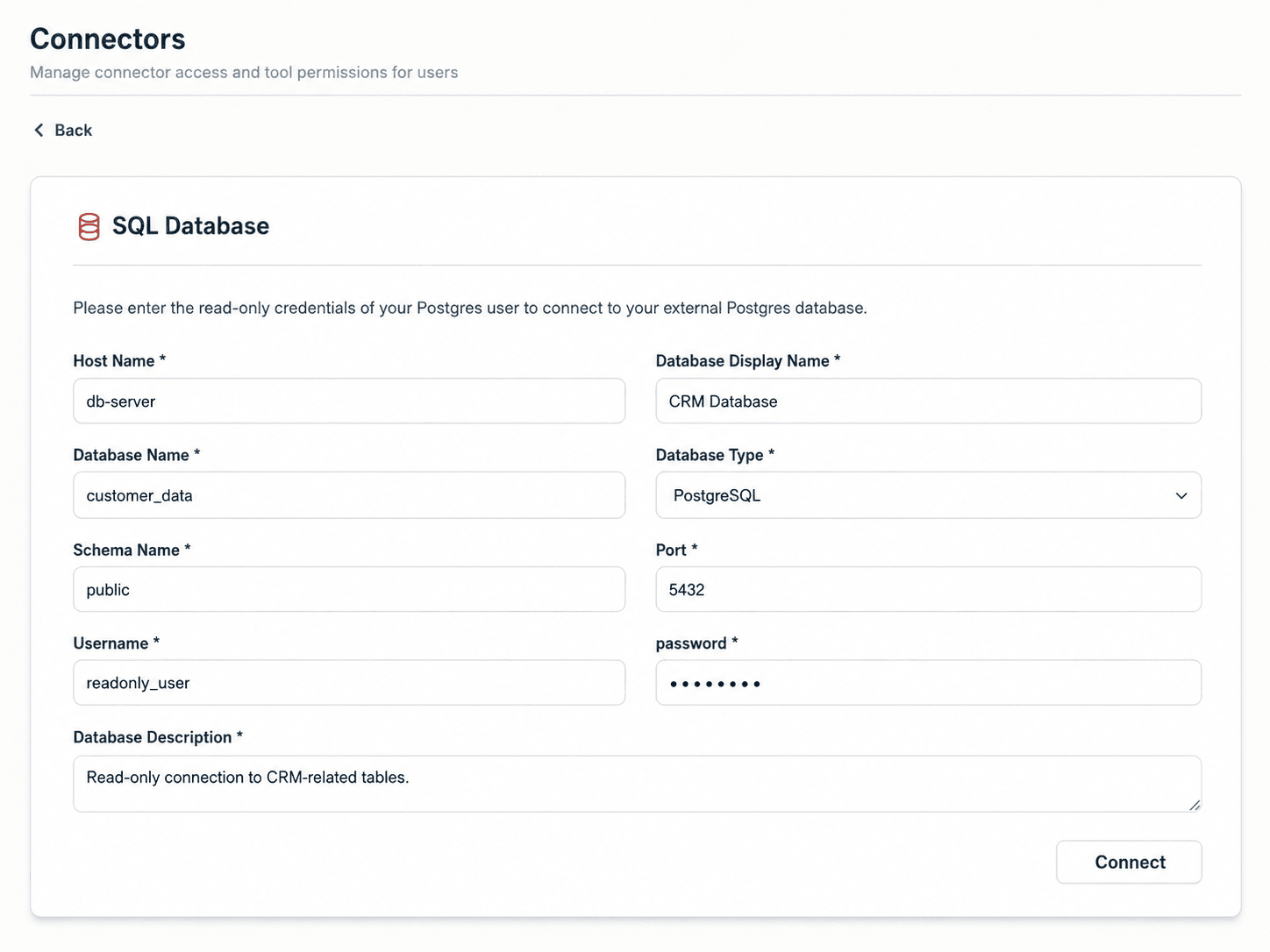
In the admin settings under “Connectors”, you will find the section Databases. Via “Add database”, you create a new database. Several database types are supported, including Postgres, MariaDB, MySQL, Oracle DB, and Microsoft SQL – along with many managed services that speak the corresponding protocols. amber thereby ensures a safe connection to your data.
Step 2: Configure access
In the form, you enter the usual values: host, port, database name, schema, user, and password. Deliberately, you use only read-only credentials – write access is not intended. For write scenarios, we recommend using an MCP server on top of the database. In addition, you provide a short database description that later serves as relevant context for the AI (e.g. “This is our CRM with all sales and support data”).
Step 3: Select and describe tables
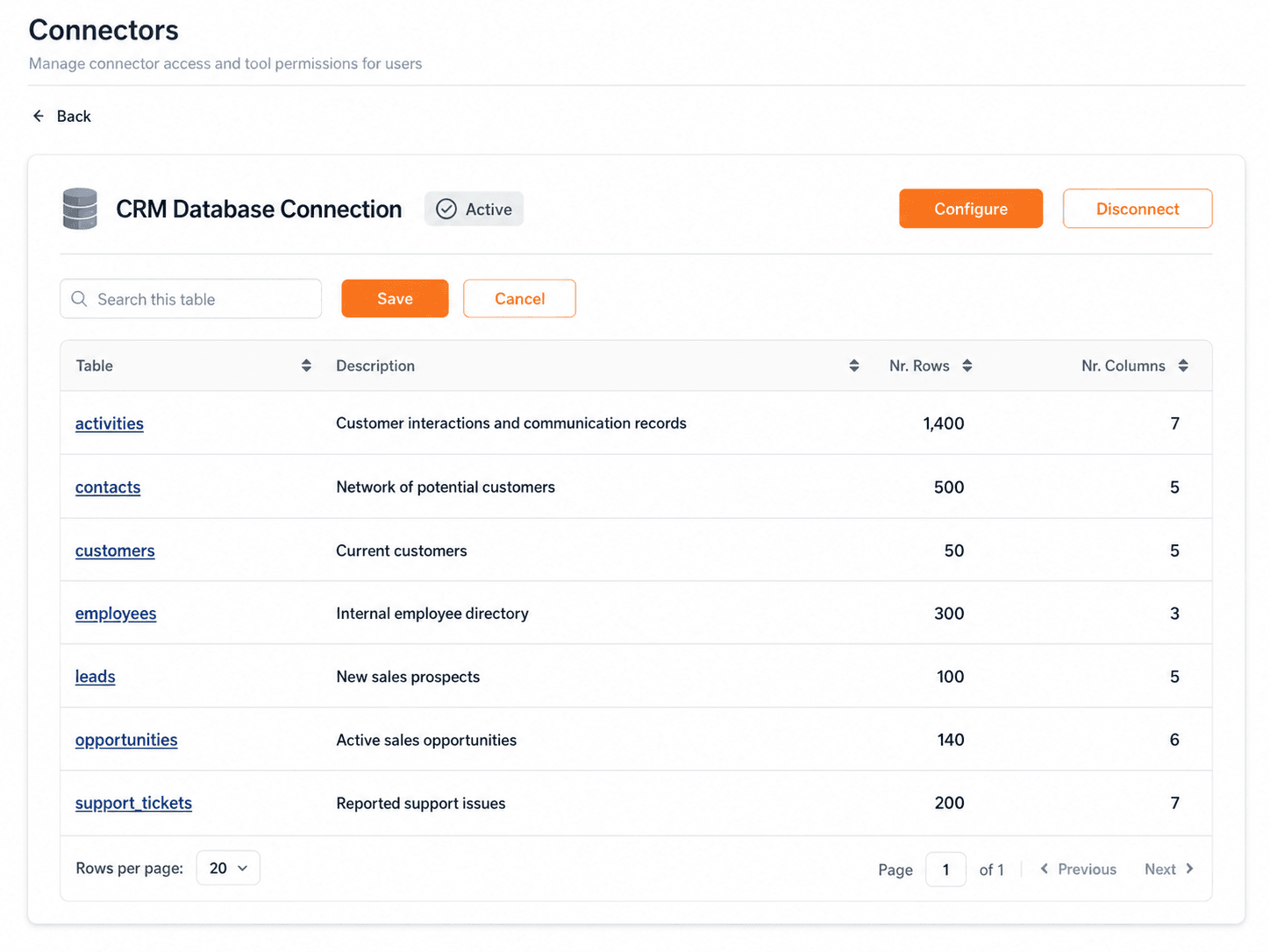
amber then shows you all available tables in the schema. Now it is your turn to curate: which tables should the AI actually be allowed to use? For each table, you provide a short description in natural language – “our current customers”, “all sales activities”, “reported support tickets”, and so on. These descriptions are crucial for answer quality, because they give the AI the business context that bare column names often lack. With this, the AI understands when to look into which tables.
Step 4: Refine columns (optional)
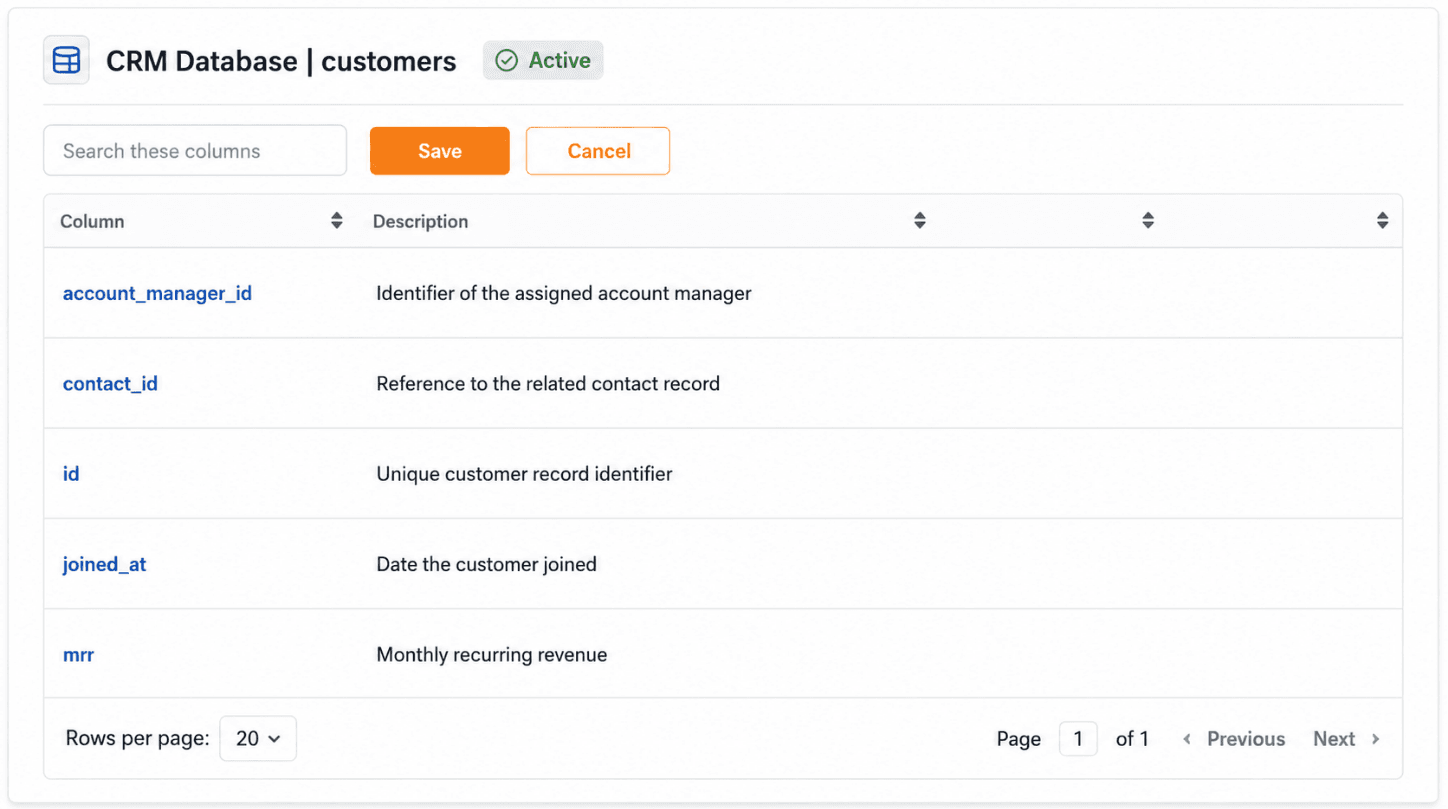
In the next step, you can further improve contextual understanding. Describe individual columns – for example, “account_manager_id = ID of the responsible account manager” or “joined_at = date the customer became a contractual partner”. This metadata measurably improves the quality of the generated queries, since the meaning of self-defined column names is often not immediately obvious.
From that point on, the database is available to the AI as a data source.
Three Use Cases That Deliver Value Right Away
1. Text-to-SQL: Query Databases in Natural Language
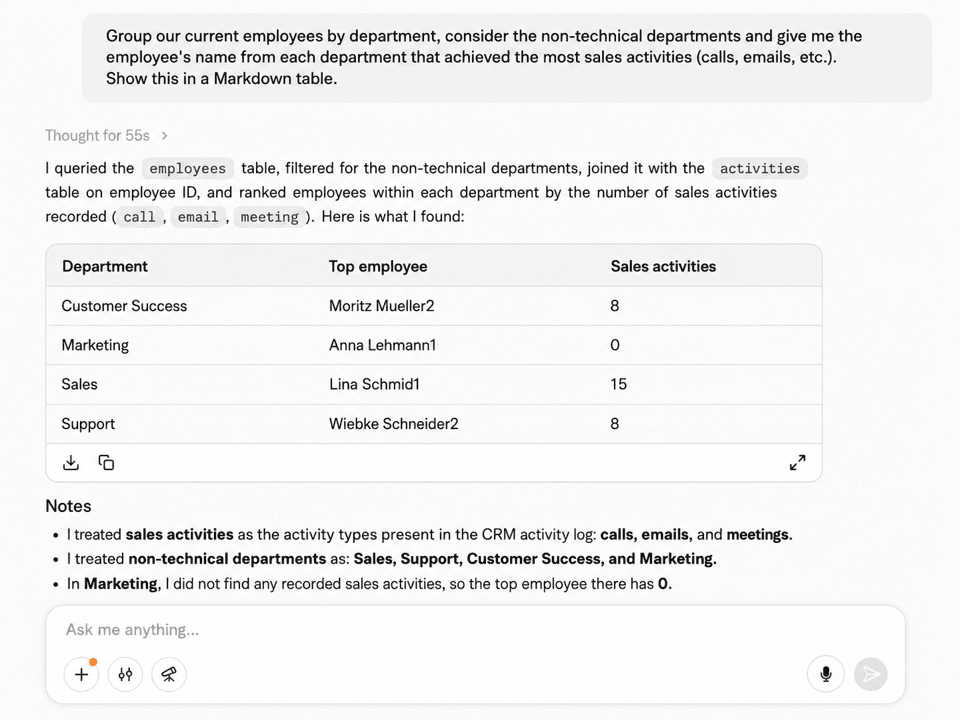
Instead of JOINs and WHERE clauses, a question is enough: “How many new leads did we have in Q1 per region?” or “Which ten customers have the highest MRR, and when did they sign on?”. The AI translates the question into a SQL query, runs it against the connected database, and returns the answer – including the underlying query, so that every analysis remains traceable and auditable.
2. From Data to Charts – Automatically
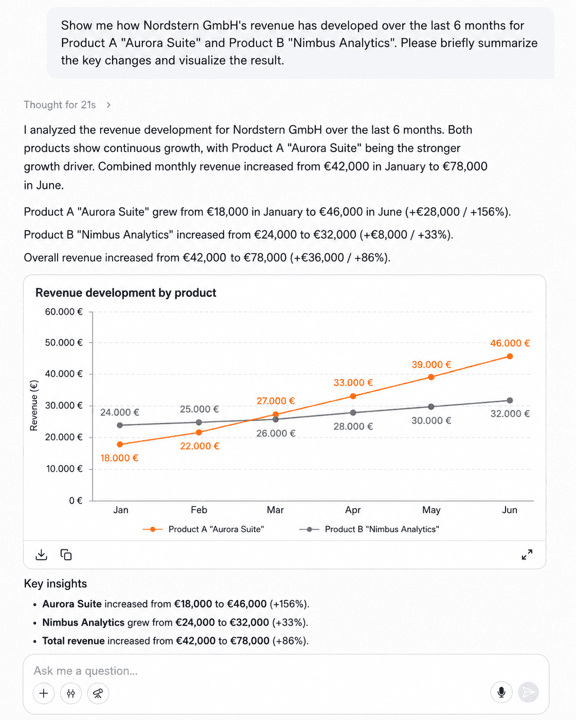
You can build on the same answer right away: “Turn this into a bar chart by region” or “Show me the MRR trend over the past twelve months as a line chart”. amber generates the visualization on the fly. Instead of switching between three tools (SQL client, Excel, BI tool), everything happens in a single conversation. This not only accelerates the analysis cycle – it also lowers the barrier to working with data in the first place.
3. Straight Into Your PPTX – In Your Corporate Design
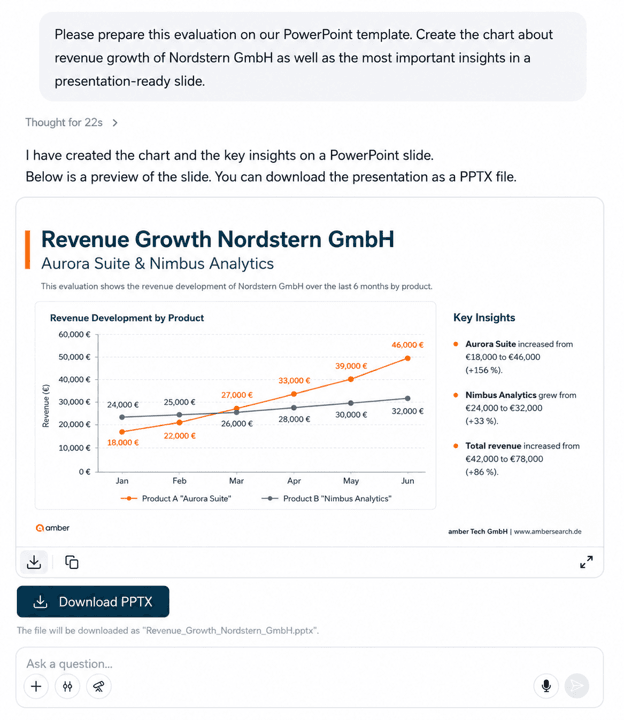
Perhaps the biggest lever for management workflows: you can embed generated charts directly into your own PowerPoint template – including corporate-design-compliant colors, fonts, and layouts. Instead of pasting screenshots into slides on a Friday afternoon, your steering deck comes together in minutes. Board meetings, investor updates, sales reviews – every recurring slide becomes a data-driven routine.
Bringing Text-to-SQL to Your Stack: Your Next Steps
If your company works with structured data, three questions should be on the agenda:
- Which two or three databases would answer the majority of internal questions if they were available at the push of a button? Usually it is the CRM, the ERP, or in-house systems.
- Which access models are realistic? Read-only credentials in an isolated schema are the pragmatic starting point – with no risk to production data.
- Which workflows would change the most if business units could create their own analyses in natural language and export them as CI-compliant slides?
The integration itself is no longer a major project. The real leap is organizational: data moves from being a bottleneck to becoming a resource that everyone can use.
Beyond Text-to-SQL: Executing Actions in Databases With AI
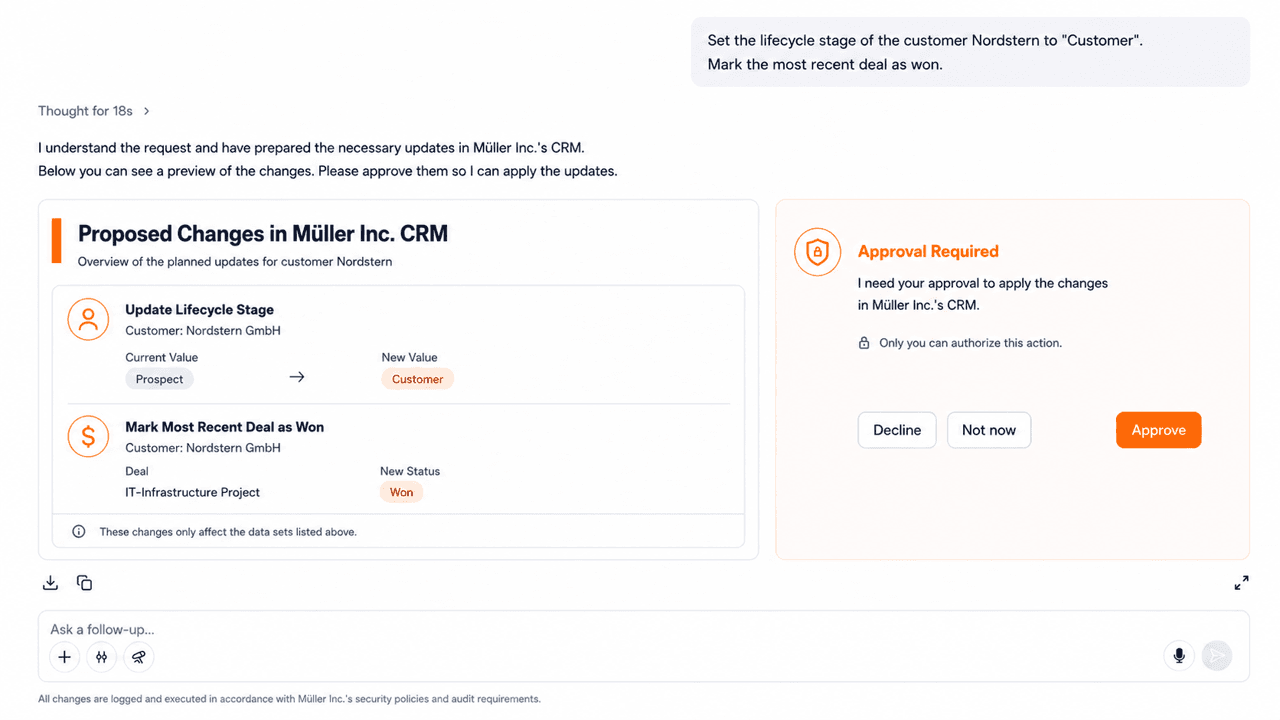
Another major benefit, made possible by technology developments since 2025, is the ability of AI models to execute actions in third-party systems. Technically, this is done via the “Model Context Protocol” interface (see MCP server).
Depending on the vendor, the provider either offers an MCP server itself, or – for in-house solutions – you can build the MCP server yourself. It can then be used by AI solutions to, for example, update information in the database. Example:
01
Cancellation
A customer cancels via email.
02
Confirmation
The support agent confirms the cancellation.
03
Action
The AI detects the confirmation and updates the customer’s status to “cancelled”.
Unlike the other capabilities described in this section, this is naturally not a read-only approach, but a write capability.
Frequently Asked Questions About Text-to-SQL
What is text-to-SQL?
With text-to-SQL, a large language model translates a question in natural language into a SQL query, runs it against the connected database, and returns the answer – including the underlying query, so that every analysis remains traceable and auditable.
How long does it take to connect a SQL database to amber?
The connection takes under five minutes and requires no code at all: create a database connector, configure access, select and describe tables, and optionally describe individual columns.
Which databases are supported?
Several database types are supported, including Postgres, MariaDB, MySQL, Oracle DB, and Microsoft SQL, along with many managed services that speak the corresponding protocols.
Can the AI change data in the database?
Not via the SQL integration in amber: it uses only read-only credentials, and write access is not intended. For write scenarios such as updating a customer’s status, an MCP server on top of the database is recommended.
Why should I describe tables and columns?
The descriptions give the AI the business context that bare column names often lack. The AI then understands when to look into which tables, and the quality of the generated queries measurably improves.
What can I do with the results of a query?
amber can turn the answer into a chart right away, such as a bar or line chart. Generated charts can be embedded directly into your own PowerPoint template, including corporate-design-compliant colors, fonts, and layouts.