
AI Agents & Assistants
AI agent examples: 10 real-world use cases
Ten concrete examples of AI agents from sales, customer service, HR, IT and compliance: with the data they need, the effort involved, typical ROI and risks.

AI agent examples: from potential to practice
AI agents have become a practical technology for companies. While the strategic importance of AI agents for businesses is widely discussed, a concrete look at the application level is often missing. This guide closes that gap with examples from everyday business rather than with the basics.
If you first want to understand what an AI agent is and how it works step by step, our introductory article will help.
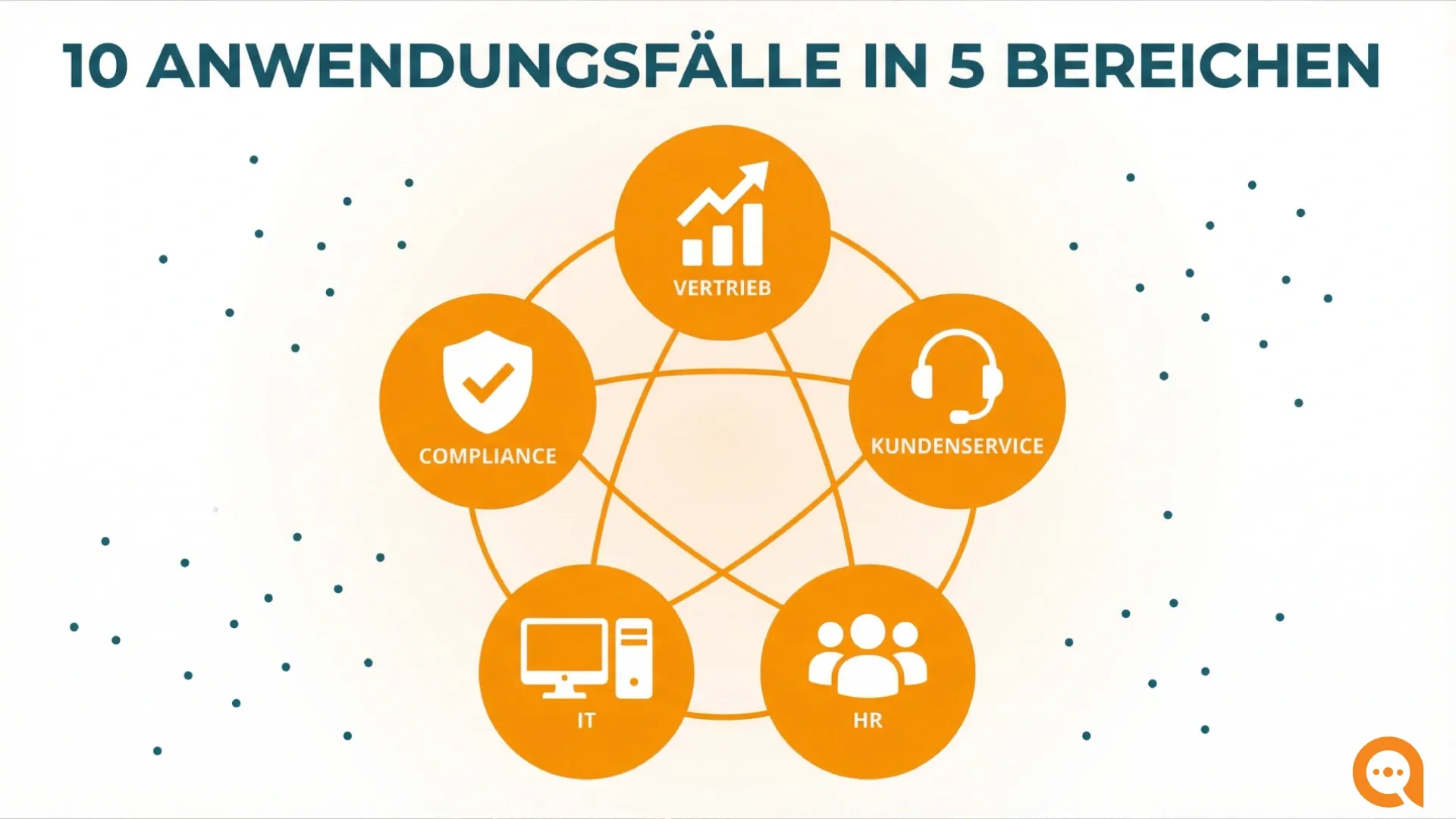
Here you will find ten use cases from five core business areas. Each case is examined in a structured way:
- What actually happens?
- What data does the agent need?
- What is the typical implementation effort?
- What ROI do companies often see?
- Where are the risks and how do you deal with them?
The aim is to give you a solid basis for identifying relevant scenarios for your company.
Sales: process efficiency in customer acquisition
In sales, AI agents can take over repetitive tasks and increase efficiency. Time-consuming processes such as creating quotes or evaluating leads can be sped up this way.
Use case 1: automated quote creation
What actually happens? An AI agent creates individualized quotes. It analyzes a customer inquiry, matches it against the product catalog and calculates the price, taking discounts and contract histories into account. It then generates a formatted quote document. A sales representative in mechanical engineering uses such an agent to create standard quotes for spare parts in minutes instead of hours. The agent checks availability in the ERP, pulls the relevant contract terms from the CRM and creates a draft that the employee only needs to review and send.
- Data required
- CRM (customer data, contracts), ERP (product availability, prices), product database, quote templates.
- Implementation
- For standardized processes, approx. 4 to 6 weeks. For complex product configurations, more like 8 to 10 weeks.
- Typical ROI
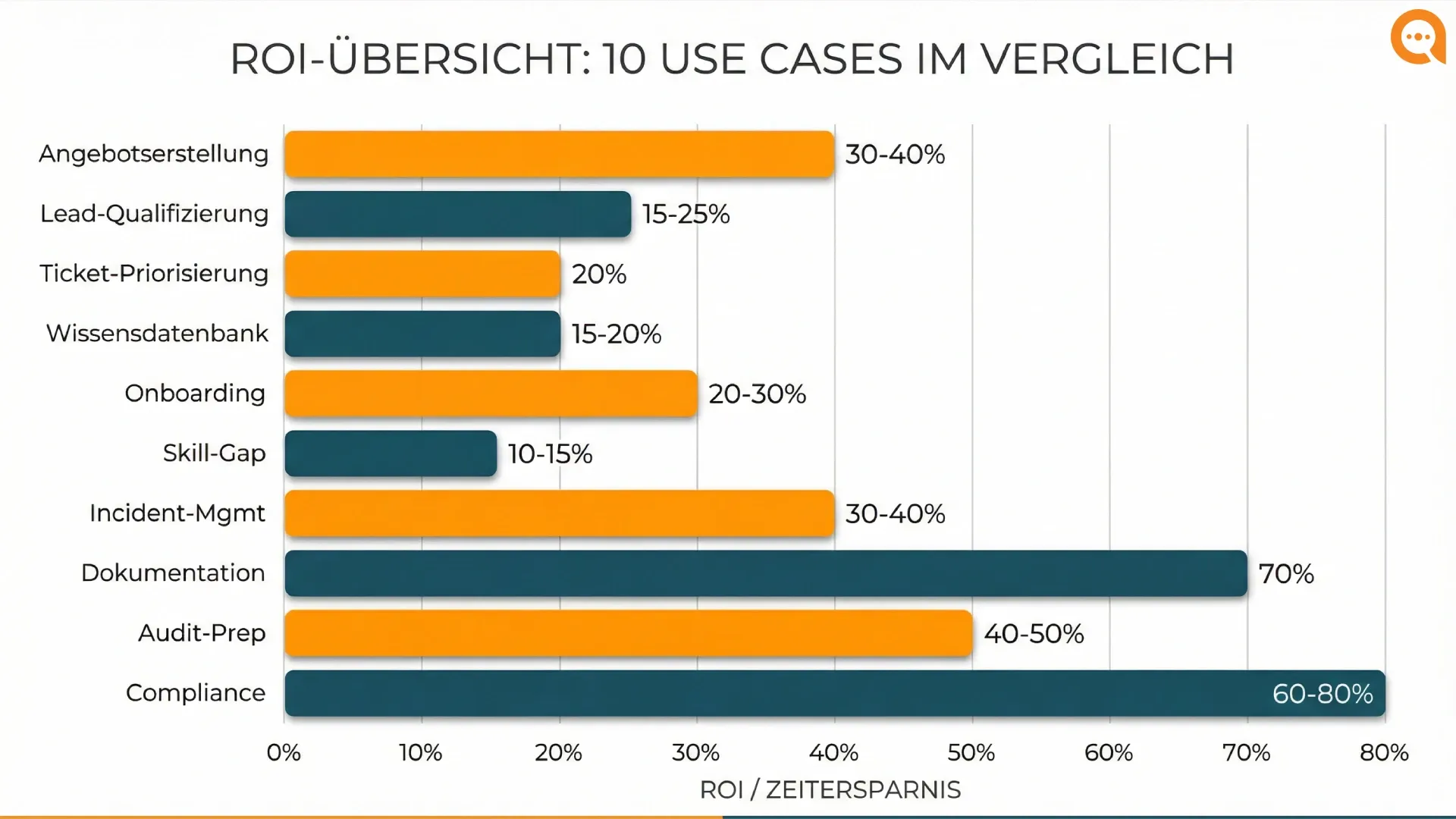
- Time savings in quote creation are often 30 to 40%. This increases throughput and improves quote quality through consistent data.
- Risks & mitigation
- Risk: Incorrect price calculation. Mitigation: A “human-in-the-loop” approval process for quotes above a defined value.
Use case 2: lead qualification and assignment
What actually happens? An AI agent evaluates incoming leads, for example from web forms. It analyzes the information (industry, company size, budget) and compares it with data from successful deals. Based on a score, the lead is prioritized and assigned to the right sales representative.
- Data required
- CRM (historical lead data, conversion rates), marketing automation platform, internal knowledge base.
- Implementation
- Usually 3 to 5 weeks. The effort lies in defining the scoring criteria and calibrating the model.
- Typical ROI
- Because high-quality leads are handled faster, the conversion rate can rise by 15 to 25% in many projects. The manual screening effort goes down.
- Risks & mitigation
- Risk: Lead quality is assessed incorrectly. Mitigation: A continuous feedback loop in which sales representatives rate the assigned leads so the model can be readjusted regularly.
Customer service: faster and more accurate handling
In customer service, AI agents improve response times and the quality of support by drawing on extensive contextual knowledge and prioritizing inquiries intelligently.
Use case 3: intelligent ticket prioritization and suggested solutions
What actually happens? An AI agent analyzes incoming support tickets. It categorizes the request, assesses its urgency (based on SLAs or customer value) and suggests concrete solution steps to the employee based on similar, resolved cases. The agent can often draft a reply that the employee only needs to check.
- Data required
- Ticket system (historical tickets), CRM (customer data, SLAs), knowledge base (FAQs, guides), ERP (order history).
- Implementation
- Around 5 to 7 weeks. A large part of this is preparing historical ticket data.
- Typical ROI
- The average first contact resolution rate often rises by 20% while response time falls. This typically improves customer satisfaction (CSAT) by 10 to 15 percentage points.
- Risks & mitigation
- Risk: Incorrect prioritization leads to SLA breaches. Mitigation: Conservative calibration of urgency and the option for the employee to review it manually.
Use case 4: automatic knowledge base maintenance
What actually happens? An AI agent monitors support tickets and identifies recurring questions that are missing from the knowledge base. It automatically drafts suggestions for new FAQ entries or updates existing articles. A knowledge manager reviews these suggestions before they are published.
- Data required
- Ticket system, knowledge base, product documentation.
- Implementation
- Comparatively lean, often feasible in 3 to 4 weeks, as the focus is on text analysis and pattern recognition.
- Typical ROI
- An up-to-date knowledge base can reduce ticket volume by 15 to 20%. Manual maintenance effort often falls by up to 60%.
- Risks & mitigation
- Risk: Incorrect articles end up in the knowledge base. Mitigation: A strict approval process by a knowledge manager. The agent only delivers drafts.
HR: efficient people processes

AI agents can take over administrative tasks in the HR department and free up time for strategic topics.
Use case 5: automating the onboarding process
What actually happens? An AI agent manages the onboarding process. It creates personalized plans, coordinates the provision of hardware and software access and answers common questions from new employees. An IT service provider uses this to make sure all systems are ready on a new developer’s first day. The agent informs IT about what is needed, orders the hardware and reminds the team lead about the welcome meeting.
- Data required
- HR system (employee data), IT service management, learning management system, internal knowledge base.
- Implementation
- More demanding because of the many interfaces, approx. 6 to 8 weeks.
- Typical ROI
- The “time to productivity” of new employees can be shortened by 20 to 30%. The HR department often saves 5 to 8 hours of administrative work per hire.
- Risks & mitigation
- Risk: An impersonal onboarding experience. Mitigation: The agent only takes over administrative tasks. Personal conversations and team integration stay in human hands.
Use case 6: skill gap analysis and training recommendations
What actually happens? An AI agent analyzes employees’ skills (from performance reviews and projects) and compares them with the company’s strategic goals. It identifies gaps and suggests suitable individual training measures.
- Data required
- HR system, performance reviews, project management system, learning management system.
- Implementation
- Around 5 to 7 weeks, as the competency profiles need to be modeled carefully.
- Typical ROI
- Targeted training can increase employee productivity and reduce staff turnover. Employees value personalized recommendations.
- Risks & mitigation
- Risk: Employees feel monitored. Mitigation: Transparent communication about the purpose (development, not control) and an opt-in option.
IT: a stable and efficient system landscape
In IT, AI agents can ease the workload in troubleshooting and documentation and improve service quality as a result.
Use case 7: automating incident management
What actually happens? An AI agent monitors the IT infrastructure. When an outage occurs, it analyzes logs, compares the problem with historical incidents and identifies the likely cause. It can initiate simple remediation steps (e.g., restarting a service) or give the IT support team recommendations for action.
- Data required
- IT service management system, monitoring tools (logs, metrics), configuration management database (CMDB).
- Implementation
- Complex, approx. 8 to 10 weeks, as integration with various tools is required.
- Typical ROI
- Mean time to repair (MTTR) falls by 30 to 40% in many cases. This leads to higher system availability.
- Risks & mitigation
- Risk: Automatic interventions make a problem worse. Mitigation: The agent only carries out predefined, low-risk actions. Critical interventions require manual approval.
Use case 8: automatic generation of technical documentation
What actually happens? An AI agent analyzes code repositories and configuration files and generates technical documentation from them (e.g., API descriptions). When the code changes, the agent updates the documentation automatically. A software team uses this to have the API documentation updated automatically after every release. Developers no longer have to take care of it, and the documentation is always up to date.
- Data required
- Code repositories (e.g., Git), configuration management database (CMDB), CI/CD tools.
- Implementation
- Around 4 to 6 weeks, depending on the complexity of the system landscape.
- Typical ROI
- The time spent on manual documentation maintenance can be reduced by up to 70%. Documentation quality improves, and it stays up to date.
- Risks & mitigation
- Risk: Sensitive information (e.g., API keys) ends up in the documentation. Mitigation: Filters that detect and anonymize sensitive data.
Compliance: security in regulated environments
AI agents can ease the workload of compliance departments and make processes easier to trace.
Use case 9: automated audit preparation
What actually happens? An AI agent supports the preparation for audits. It automatically identifies and collects all relevant documents, records and evidence. It can also spot gaps in the documentation and alert the responsible employees.
- Data required
- Document management system (DMS), compliance management system, ERP system, HR system.
- Implementation
- Around 5 to 7 weeks, as the documents need to be mapped precisely to the audit requirements.
- Typical ROI
- Preparation time for audits can be reduced by 40 to 50%. The risk of overlooking evidence goes down.
- Risks & mitigation
- Risk: An incomplete collection of documents. Mitigation: The agent creates a checklist. A compliance manager checks completeness before the audit.
Use case 10: continuous policy compliance checks
What actually happens? An AI agent monitors business processes and transactions for compliance with internal and external policies (e.g., GDPR). If it detects deviations, it alerts the people responsible and suggests corrective measures. This makes proactive risk reduction possible.
- Data required
- Email archives, ERP system, CRM system, DMS, external regulatory databases.
- Implementation
- Demanding, approx. 8 to 12 weeks, due to the complexity and sensitivity of the data.
- Typical ROI
- The number of compliance violations can be reduced significantly. This lowers the risk of fines and reputational damage.
- Risks & mitigation
- Risk: Data protection concerns about monitoring. Mitigation: Transparent communication, compliance with data protection rules (e.g., by involving the works council) and a focus on structured data.
What the examples have in common: cross-cutting success factors
The same three factors decide the success of AI agent projects in all ten examples.
Where to start? A simple roadmap
Evaluate the use cases presented here by their potential business value and how feasible they are in your company. It makes sense to start with a scenario that promises high value for moderate effort. A “quick win” like this creates visibility and secures support for future projects.
Conclusion
The use cases presented here show that AI agents can already deliver measurable improvements in many areas of a company today. Success depends on choosing the right use case, careful implementation and good change management. Use this guide as a basis for identifying the scenarios that matter most to you.
If you would like to see more concrete examples of modern AI agents, here is a detailed overview of how amberAgents work in real system landscapes.
Frequently asked questions about AI agent use cases
In which business areas can AI agents be used?
The guide shows ten use cases from five areas: sales (quote creation, lead qualification), customer service (ticket prioritization, knowledge base maintenance), HR (onboarding, skill gap analysis), IT (incident management, technical documentation) and compliance (audit preparation, policy compliance checks).
How long does it take to implement an AI agent?
That depends on the use case. Lean scenarios such as knowledge base maintenance can often be implemented in 3 to 4 weeks, lead qualification in 3 to 5 weeks. Use cases with many interfaces or sensitive data, such as incident management (approx. 8 to 10 weeks) or continuous policy compliance checks (approx. 8 to 12 weeks), take more effort.
What ROI do AI agents deliver?
Typical values from the guide: 30 to 40% time savings in quote creation, 30 to 40% shorter mean time to repair (MTTR) in incident management, up to 70% less effort for documentation maintenance and 40 to 50% shorter audit preparation. These are estimates based on experience.
How do you deal with the risks of AI agents?
Depending on the use case, with a “human-in-the-loop” approval process, feedback loops for readjustment, only predefined, low-risk actions, filters for sensitive data, and transparent communication and compliance with data protection rules, for example by involving the works council.
What are the most important success factors for AI agent projects?
Three factors are central: data quality as the foundation, change management and employee acceptance, and security and governance with clear rules about who may access which data and which actions may be performed.
Which use case should you start with?
Evaluate the use cases by business value and feasibility and start with a scenario that promises high value for moderate effort. A “quick win” like this creates visibility and secures support for future projects.