
AI Agents & Assistants
AI agents for businesses: benefits, security, vendors and costs
The short definition: AI agents for businesses are AI systems that break a given goal down into sub-steps on their own, access approved data and tools to do so, and deliver a result you can verify. Unlike a chatbot, they don’t just answer questions, they get tasks done. And they do it within the access rights and rules you set.
Imagine a team member who never gets tired, gets up to speed on new tasks right away and follows the rules that apply. Beyond the hype, businesses face practical questions about enterprise AI agents: What do they actually do in your teams’ daily work, how do you connect them securely to your systems, what should you look for in a vendor and what does it cost? One thing up front: agents are one building block of an AI platform for businesses, and they need access to your company knowledge, clean permissions and governance.
What enterprise AI agents do for your business
An AI agent pursues a clear goal (for example, “Prepare a project report for the last quarter”), plans several sub-steps, uses tools and data sources and checks intermediate results. Technically, it is usually built on a language model from the large language model family, extended with tools, memory and rules. You’ll find the definition, how it works and simple everyday examples in the article What is an AI agent?.
For businesses, what counts most is the outcome: a chatbot answers individual questions, an agent delivers results. AI agents are autonomous units of work that decide on the next sensible step to reach their goals. This autonomy is at the heart of what is now discussed as agentic AI. How agents differ from AI assistants, which help a person write, summarize or research, is explained in What is an AI assistant?.
How an AI agent works in your business
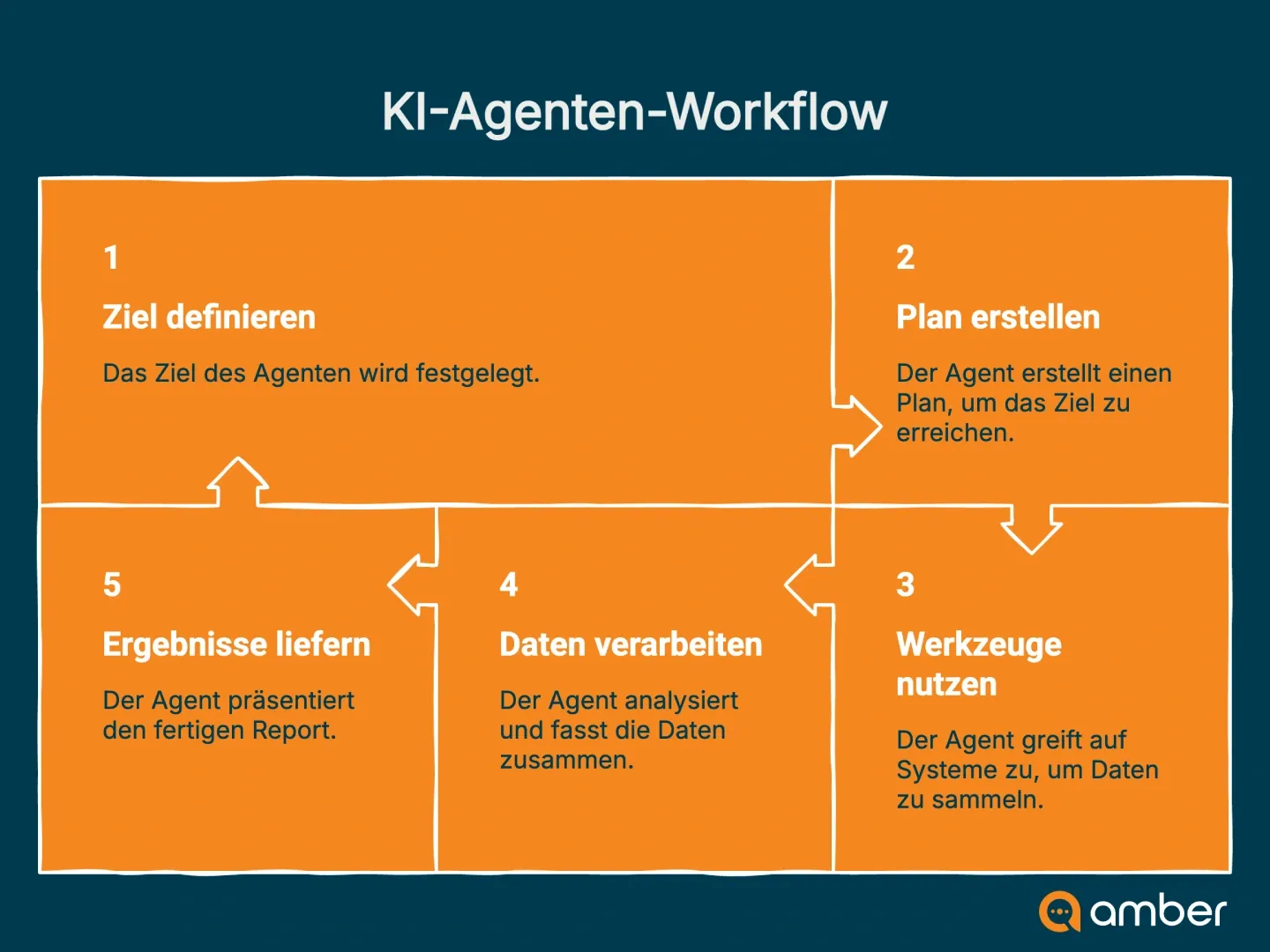
Imagine you ask your digital colleague to prepare the quarterly closing report. Depending on the configuration, this is how it works:
- 01
Step 1
Thinking and planning
The agent breaks the goal down into logical steps: “First I need the sales figures from the CRM, then the project updates from Jira and finally the budget overview from the finance software.”
- 02
Step 2
Using tools (tool use)
It accesses the various systems on its own, as if it were logging in with its own account. In doing so, it strictly observes the permissions assigned to it.
- 03
Step 3
Processing information
It extracts the relevant data, summarizes it and spots connections. For example, that a budget surplus in project “Alpha” is due to postponed milestones.
- 04
Step 4
Delivering results
Finally, it presents you with a finished draft report, including a summary of the key findings and the sources its analysis is based on.
What are the benefits of AI agents for your business?
The most direct benefit is time: the agent handles routine work that currently bounces between several systems in minutes. The ROI example further down shows what that is worth in euros. On top of that come effects that don’t show up on the balance sheet right away but pay off in the long run:
What types of AI agents are there?
The research literature distinguishes five classic types. For businesses, the classification is mainly a question of how much autonomy you give a system:
- Simple reflex agents
- react according to fixed if-then rules. A typical example: rule-based email sorting.
- Model-based agents
- store information about their environment and what has happened so far.
- Goal-based agents
- plan steps to reach a given goal. Most AI agents in business processes belong to this group.
- Utility-based agents
- weigh up several options, for example by time, cost or quality.
- Learning agents
- improve their behavior based on feedback.
When tasks get bigger, several AI agents work together. In these multi-agent systems, several specialized agents each handle one part: one researches, one checks, one writes. Whether it’s a single agent or a whole agent system, one principle always applies to agentic AI in business: autonomous AI needs clear rules about who is allowed to do what. How multi-agent systems are built is explained in the article What is a multi-agent system?.
Examples of AI agents in business
Three use cases from different departments show what AI agents for businesses look like in everyday work. What they have in common: a clear goal, connected systems and a result that a person reviews.
R&D: recovering knowledge from scattered sources
In the research and development department of an automotive supplier, valuable knowledge was scattered across network drives, SharePoint sites and old Confluence instances. An agent was given the goal: “Find all relevant documents on material fatigue in polymer composites and summarize the most important findings.” It searched all connected systems on its own, flagged contradictory statements and knowledge gaps, and delivered the summary within minutes. Result: 80% less research time and fewer costly duplicate developments.
Inside sales: quotes in 2 instead of 25 minutes
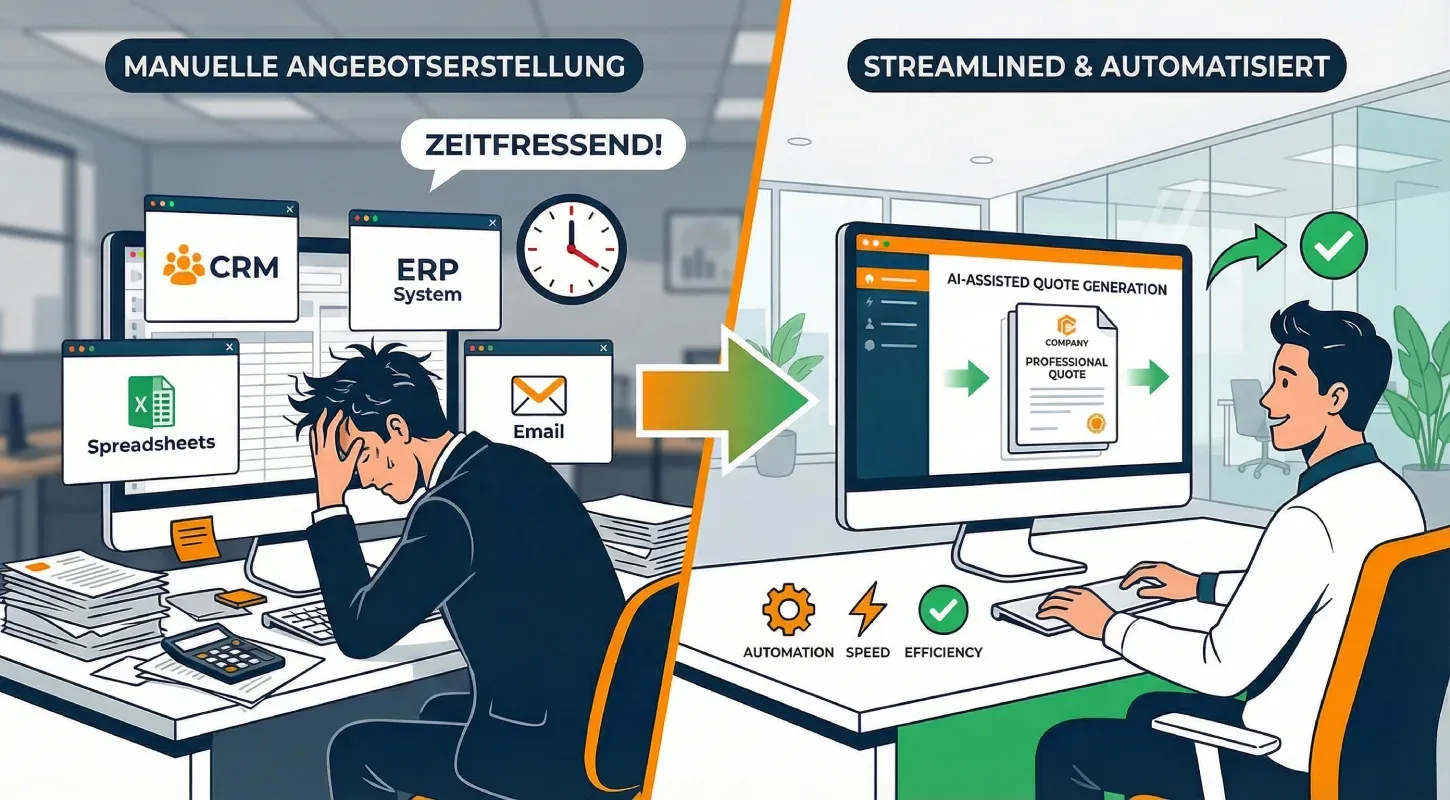
In the inside sales team of a mid-sized mechanical engineering company, every quote for standard spare parts was manual work: check availability in the ERP, look up customer-specific discounts in the CRM, clarify delivery times, copy everything into a template. Today, an agent checks the systems, calculates the price and creates a draft quote in the corporate design. The employee reviews the document and sends it. Result: 2 instead of 25 minutes per standard quote and more time for complex projects.
Compliance: audit preparation in 2 days instead of 3 weeks
In the compliance department of a financial services provider, every internal audit meant manually reviewing hundreds of emails, contracts and process descriptions. An agent collected the evidence for the implementation of a new policy from the document management system (DMS), the email archives and contract management. From this, it created auditable documentation with references to the exact locations. Result: two days of preparation instead of three weeks.
- less research time in R&D
- 80%
- to create a quote for standard parts
- 2 vs. 25 min
- to prepare an internal audit
- 2 days vs. 3 weeks
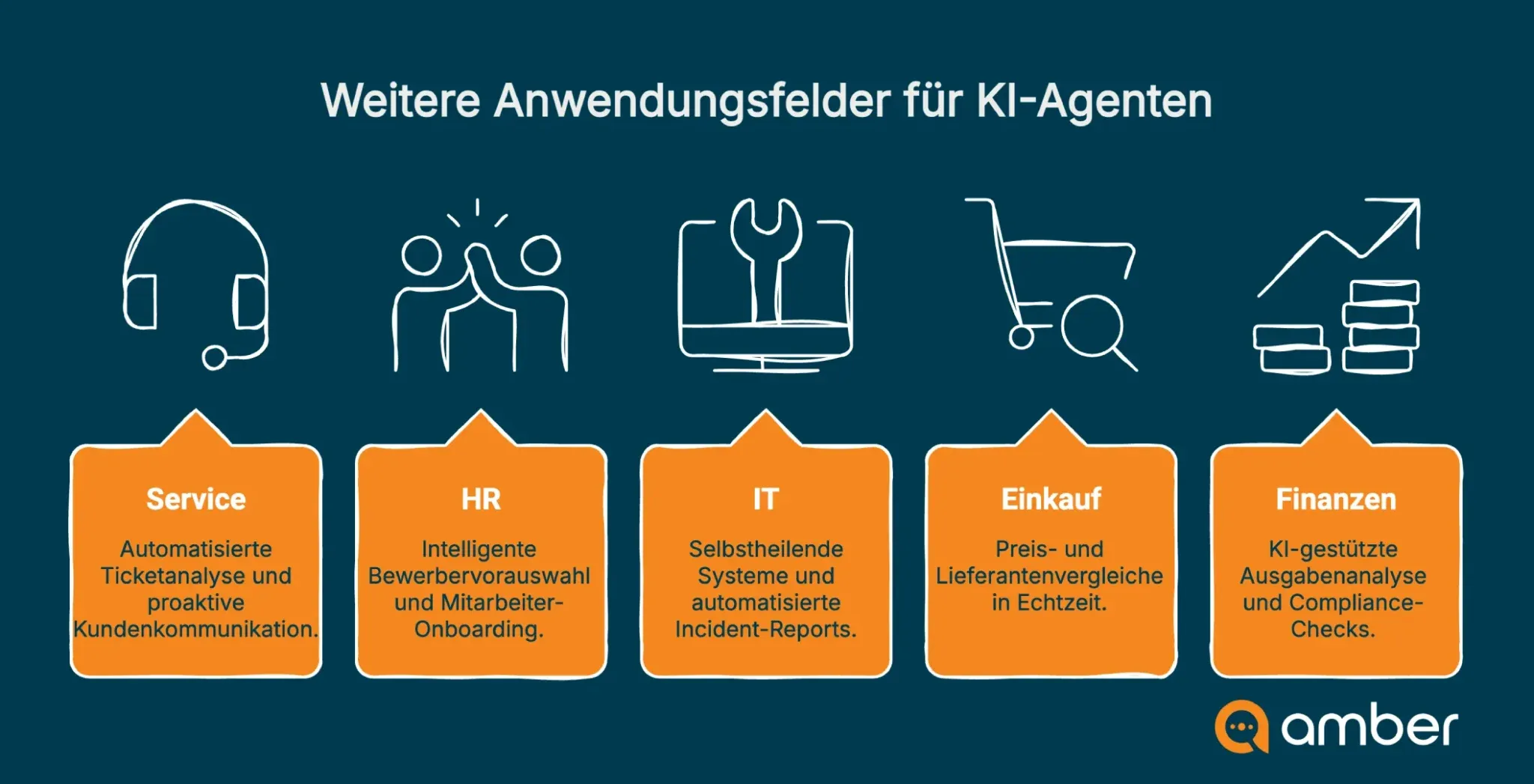
Typical areas of use range from sales and purchasing to customer service and HR, all the way to marketing and controlling. You’ll find ten use cases with concrete workflows by department in our overview of proven AI agent examples.
Integration: how AI agents fit securely into your IT landscape
Many AI solutions fail not because of the technology but because of the integration. An AI agent only takes work off your team’s plate if it fits securely into your existing IT infrastructure. That’s why at amber we designed the architecture of amberAgents, our AI agents for businesses, around the questions IT managers ask. The core principles: control, security and openness.
No loss of control: your data, your rules
The biggest concern when introducing AI is often losing control over company data. These four principles make sure you stay in control at all times:
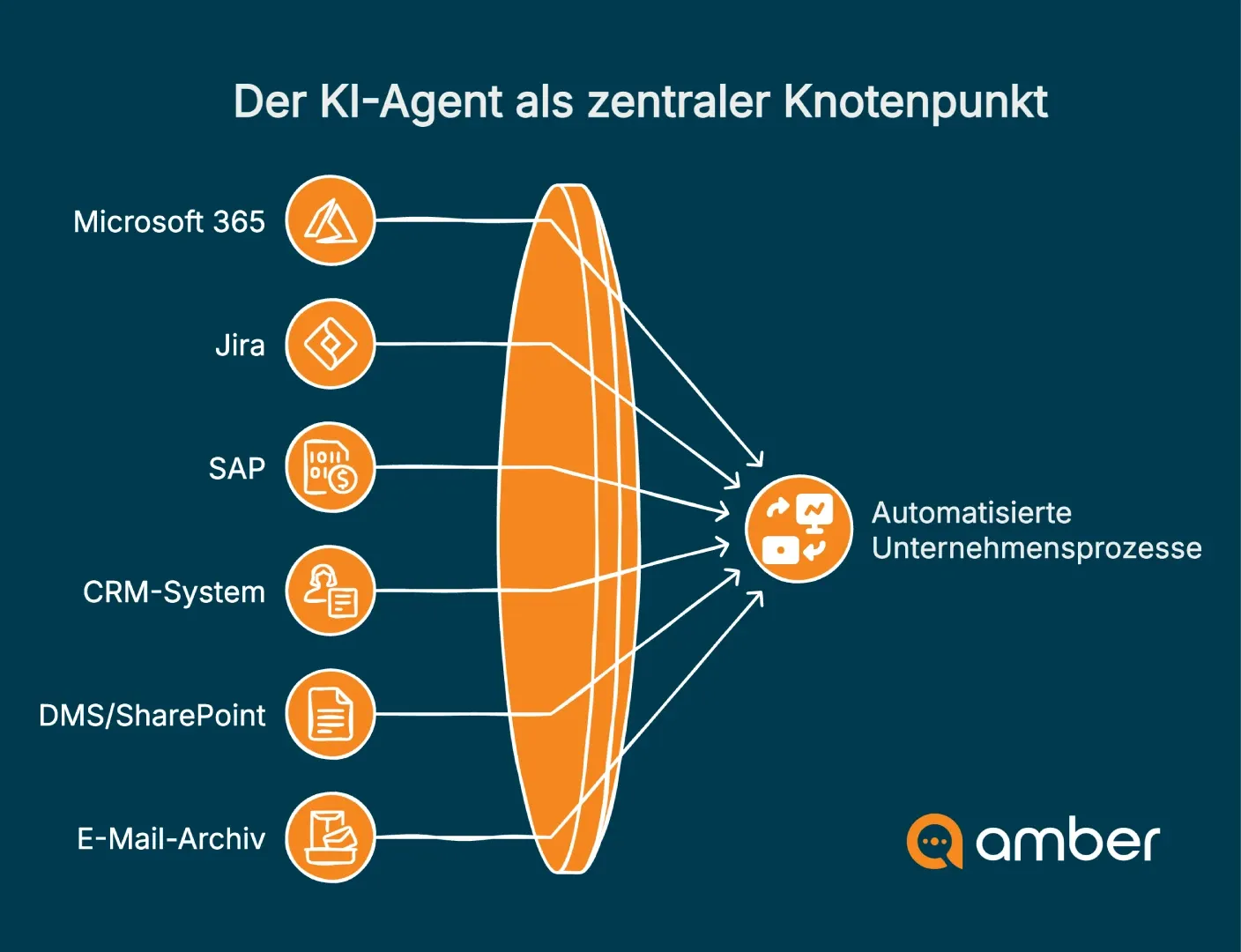
Open to your system landscape: integrations and interfaces
An AI agent only delivers its full value when it can access the relevant data sources and tools. amber connects more than 70 data sources, without migration and without copying data. On top of that come more than 120 integrations and more than 1,000 executable actions in connected systems.
| Integration type | Examples | Use case |
|---|---|---|
| Standard connectors | Microsoft 365, SharePoint, Teams, Confluence, Jira, Slack | Fast connection of the most important collaboration and knowledge platforms. |
| Databases & file systems | SQL databases, network drives (SMB/NFS), DMS | Access to structured data and unstructured document repositories. |
| Business systems (via API) | SAP, Salesforce, DATEV, Personio | Integration into core processes such as sales, finance and HR. |
| Custom connections | Proprietary in-house applications | Your specific legacy systems can also be connected via a flexible API. |
Standard connectors
- Examples
- Microsoft 365, SharePoint, Teams, Confluence, Jira, Slack
- Use case
- Fast connection of the most important collaboration and knowledge platforms.
Databases & file systems
- Examples
- SQL databases, network drives (SMB/NFS), DMS
- Use case
- Access to structured data and unstructured document repositories.
Business systems (via API)
- Examples
- SAP, Salesforce, DATEV, Personio
- Use case
- Integration into core processes such as sales, finance and HR.
Custom connections
- Examples
- Proprietary in-house applications
- Use case
- Your specific legacy systems can also be connected via a flexible API.
Integration isn’t a one-off, rigid process. Start with a single data source, such as the Confluence wiki, and connect more systems once the agent has proven its value. For connecting additional tools, the Model Context Protocol (MCP) is becoming established as an open standard. You can read how it works in MCP explained simply.
Here you can learn in detail which systems amber supports by default and how we build custom integrations.
Security, GDPR and the EU AI Act: what you need to check
As soon as AI solutions process company knowledge, compliance moves to the center. For legal, data protection and IT security teams, what matters is not how “smart” a system is. They want to know whether it is controllable, auditable and fits cleanly into your existing governance for AI use. So check these four areas. Our guide AI compliance in the enterprise gives you the full overview.
1. Data protection by design & GDPR compliance
- Purpose limitation & data minimization must be technically enforced, not just regulated organizationally.
- Data subject rights (access, erasure, restriction) must remain enforceable in AI-supported processes too.
- Data sovereignty is central: Where do models run, where are indexes located, where are logs stored? Hosting in the EU, ideally in Germany, makes the assessment considerably easier.
This becomes relevant in practice as soon as AI systems access shared network drives, M365 or ticketing systems, which are exactly the systems typical of corporate IT in Germany.
2. No unwanted model training
One of the biggest compliance risks arises when company data flows into global models without control. So check explicitly:
- Is content used exclusively for inference and not for training the AI models?
- Is it ruled out, both contractually and technically, that data is passed on to third parties or added to public model pools?
- Are there clear scopes defining which data an agent may use and which it may not?
3. Certified security processes
Many companies use established standards such as ISO 27001 to assess risks. For AI agents, this means: access controls are documented and testable, security incidents are handled through defined processes rather than ad hoc, and logs are complete, tamper-proof and audit-ready. In highly regulated environments such as manufacturing, engineering or service in particular, this is the basis for any deployment.
4. EU AI Act: preparing for upcoming obligations
The EU AI Act sets out, for the first time, clear requirements based on the risk an AI system poses. For businesses, this means:
- Classification: Is the AI agent a “limited-risk” or a “high-risk” system?
- Documentation & transparency: What data does the agent use, what risks exist, how is it controlled?
- Human-in-the-loop: Where must people be able to review, approve or intervene in decisions? And who is responsible for the result?
- Technical logging: Every model interaction must be auditable.
Prefer systems that don’t bolt these requirements on afterward but are designed for them from the start. That way, compliance doesn’t become a brake on innovation.
Compliance checklist: when an AI agent is enterprise-ready
An AI agent is only enterprise-ready if it is transparent, controllable and can be integrated into existing security and data protection structures. Specifically, this means:
- no black-box mechanisms
- clear, verifiable data flows
- complete logging
- technical & organizational measures at EU standard
- clear governance for model access and authorization
amber is ISO 27001 certified and GDPR compliant. You’ll find all security and data protection measures and certificates here.
Choosing AI agents for businesses: vendors and criteria
Which AI agent vendors are there? Broadly, there are three routes. Which one fits depends less on the technology than on your starting point: Who builds, who runs and who uses the agents?
| Vendor type | Example | A good fit if |
|---|---|---|
| Agent tools from large software ecosystems | Microsoft Copilot Studio, which Microsoft describes as a platform for building and managing agents (as of October 2026) | most of your work happens within that ecosystem. |
| Open-source frameworks | Frameworks that development teams use to build their own agent workflows | you have your own development team that wants to build and run agents. |
| Business AI platforms | amber with amberAgents | you want ready-to-configure agents that build on your existing permissions and data sources. |
Agent tools from large software ecosystems
- Example
- Microsoft Copilot Studio, which Microsoft describes as a platform for building and managing agents (as of October 2026)
- A good fit if
- most of your work happens within that ecosystem.
Open-source frameworks
- Example
- Frameworks that development teams use to build their own agent workflows
- A good fit if
- you have your own development team that wants to build and run agents.
Business AI platforms
- Example
- amber with amberAgents
- A good fit if
- you want ready-to-configure agents that build on your existing permissions and data sources.
The lines are blurring. What matters more than the label is which data an agent accesses and who controls it. Our comparison with Microsoft Copilot shows how amber and Microsoft Copilot differ in practice.
Seven questions for choosing a vendor
- Permissions: Does the agent adopt existing access rights, or do you need a second permission system?
- Data location: Does processing take place in an EU cloud, in your private cloud or on-premises?
- Model training: Is your content used exclusively for inference and not for training?
- Model choice: Can you choose the AI model for each task, without lock-in to a single model provider?
- Integration: Are there connectors for your core systems and an API for in-house solutions?
- Control: Are all actions logged, and can you define where a person gives approval?
- Evidence: Are there certifications such as ISO 27001 and documented GDPR compliance?
If you settle these questions before your first pilot project, you save yourself extra rounds with IT security and data protection later on.
Introducing AI agents: 5 phases to your first pilot project
Don’t start with the biggest, most complex problem. Start with a use case that has a clear pain point and a measurable benefit. Focus on one goal, one department and one data source. A five-phase process has proven itself in practice:
- Phase 1, goal setting (weeks 1 to 2): The business unit and IT define a measurable goal, for example “Processing time for standard service requests should drop by 30%.”
- Phase 2, test pilot (weeks 3 to 6): The first agent runs in a secure test environment, connected to the most important data source. A small group tests it and gives feedback.
- Phase 3, dress rehearsal (weeks 7 to 10): Testing under real conditions, measured against the goals from phase 1.
- Phase 4, go-live (weeks 11 to 12): Evaluate the results, train users and make the first “quick win” visible across the company.
- Phase 5, scaling and operation (ongoing): More use cases, data sources and departments, managed through a central governance model and an internal center of excellence.
You’ll find checklists and best practices for each phase in our practical guide to implementing AI agents.
What does an AI agent cost? Costs and ROI at a glance
What makes up the costs
As with all AI solutions, the costs depend on the pricing model: billing is per user or based on usage, for example by runs or tokens. On the cost side, that means:
- Licenses or usage-based fees
- Use of the AI models
- Integration and setup
- Internal time for rollout and operation
You’ll find amber’s pricing on the pricing page. But what counts is not the price alone, it’s what you weigh it against.
The hard facts: time is money
The easiest benefit of AI agents to measure is greater efficiency. Take the inside sales example: a standard quote used to take 25 minutes, with the AI agent it takes 2 minutes. That’s 23 minutes saved per quote. Let’s do the math. Assumptions:
- 20 quotes per day
- 23 minutes saved per quote
- Internal hourly rate of €50
Calculation:
- Daily time saved: 20 quotes × 23 minutes = 460 minutes ≈ 7.7 hours
- Monthly time saved (at 20 working days): 7.7 hours/day × 20 days = 154 hours
- Monetary benefit: 154 hours × €50/hour = €7,700 per month
Compare this figure with the total costs. Often it justifies the investment on its own. The soft factors such as employee satisfaction, decision quality and fewer errors come on top. As with any investment in artificial intelligence, the ROI is made up of hard metrics and qualitative factors.
Next step: test AI agents with your own data
Want to see how an AI agent works with your own data and in your own system landscape? In a personal 30-minute demo, we’ll show you how we identify a first use case in your company and put it into practice with you as a risk-free pilot. Request your personal demo now
The most common questions about AI agents in business
What does an AI agent cost?
As with all AI solutions, it depends on the pricing model: per user or based on usage (runs, tokens). On top of that come integration, setup and operation. Compare the total costs with the time saved, as in the ROI example above. You’ll find amber’s pricing on the pricing page.
Which AI agent vendors are there?
Broadly, there are three routes: agent tools from large software ecosystems such as Microsoft Copilot Studio, open-source frameworks that development teams use to build their own agent workflows, and business AI platforms such as amber. amberAgents work on the basis of your company knowledge from more than 70 data sources, adopt your existing permissions and automate recurring work steps without programming. Whichever vendor you choose, check permissions, data location, model training and logging.
What are examples of AI agents in business?
One agent searches scattered knowledge sources and summarizes the key findings, a second creates draft quotes from ERP and CRM data, a third collects evidence for internal audits. In the examples above, research time fell by 80%, and a standard quote took 2 instead of 25 minutes. You’ll find more use cases by department in our overview of AI agent examples.
Does an AI agent only see the data it’s allowed to see?
Yes. An amberAgent never acts outside the permissions you give it. Access to your systems (e.g., Microsoft 365, network drives) always happens via an identity that is subject to the same rules as any human employee. If an employee in the marketing department has no access to financial data, an agent working for them doesn’t have that access either. This is ensured through your existing identity management (e.g., via SSO/Entra ID).
Can AI agents also change data in our systems?
Yes, but only if you explicitly allow it. Using policies, you define exactly which actions an agent may perform. For example, an agent in the service area may only “create draft responses” but never close a ticket for good. This way, you start with read access and gradually enable more write capabilities as trust in the process grows.
How do you avoid “hallucinations,” i.e., made-up facts?
Our agents are trained to work from sources. This means they don’t invent answers but always derive them from the verified data sources you’ve connected. For every statement an agent makes, it provides the exact evidence on request, meaning the link to the document, the page and the paragraph its information is based on. This makes its results verifiable and builds trust.